


Can't watch Video after Asus bios and nvidia driver updated

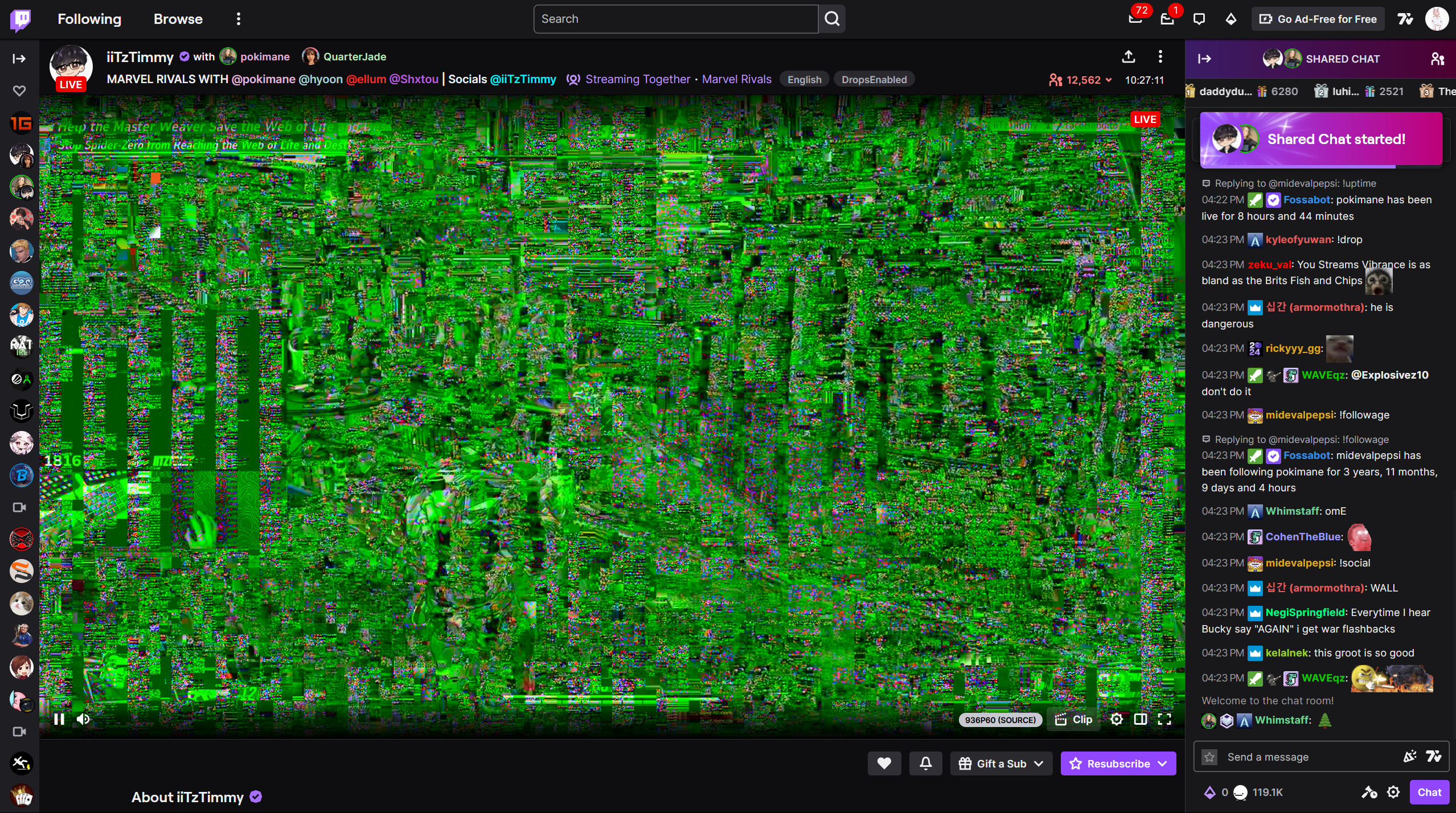
I can't watch Twitch live stream and videos after updated.When I watching live stream on Twitch, the stream start showing some old tv effect but in colours green. I thought was Twitch problem, then I changed to watch video from my college by using their website. But it still has that effect. But I can watch Youtube videos with no problems. Then i changed to use Microsoft Edge to watch Twitch, surprisingly with no problem. I already updated to the latest version in Firefox. Can anyone help me Please. Thank You
Vald lösning
Update: It is because the hardware acceleration. Turn it off then it would be fine. Please Firefox fix it .
Läs svaret i sitt sammanhang 👍 0Alla svar (4)
Update: When i open troubleshoot mode, those problem won't happen.
Vald lösning
Update: It is because the hardware acceleration. Turn it off then it would be fine. Please Firefox fix it .
Im using Asus G16 2024.

Apparently this can be resolved by going to about:config and disabling media.wmf.zero-copy-nv12-textures. You can read more here. There are two settings and I disabled both. https://bugzilla.mozilla.org/show_bug.cgi?id=1939991