


Launch geometry

The latest version of Firefox (115) always launches at fullscreen size in linux. I rarely use any application at full screensize because I like to have other windows open on the desktop at the same time. Virtual desktops are not always convenient. I have tried using the -geometry option at the command line, which is usual honoured by applications running under X11, but this is ignored. Nor can I grab the bottom right-hand corner and drag it diagonally to resize it dynamically. Maybe there is a setting somewhere for initial size?
Alla svar (2)

Vald lösning
What OS? What desktop? Here's my option in KDE. see screenshot
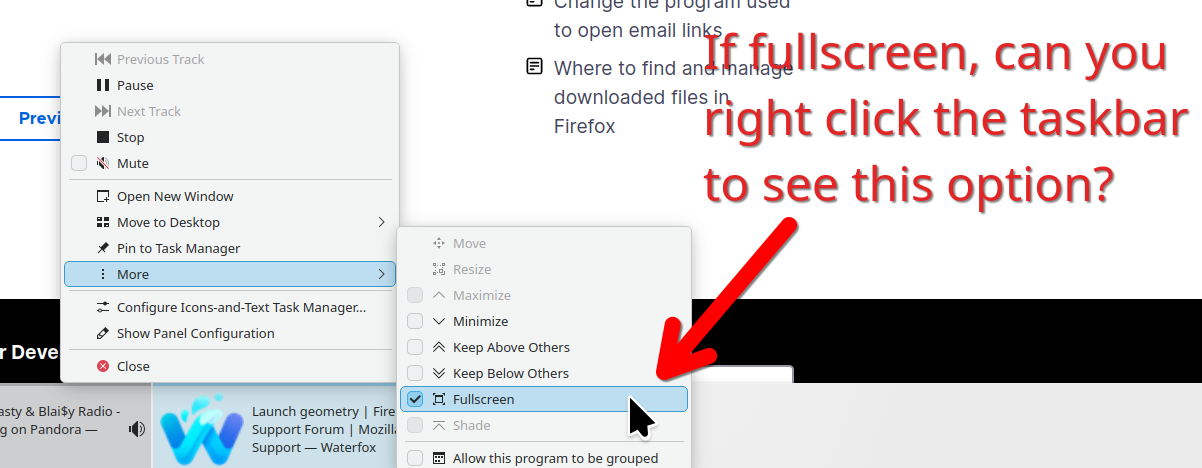
Thanks jonzn4SUSE
Your solution shows 'unmaximize' here, which comes to the same thing. I had by then spotted the suggestion about setting height and width at launch if using the commandline and that worked fine.
I am running the Mate desktop on Mageia Linux version 9 and usually launch the browser from a panel icon. Launching from the system menus paints Firefox fullscreen but your fix shows the unmaximize option again.
Kind regards - tarazed