

Denna tråd har arkiverats.
Ställ en ny fråga om du behöver hjälp.

Löst
Arkiverad
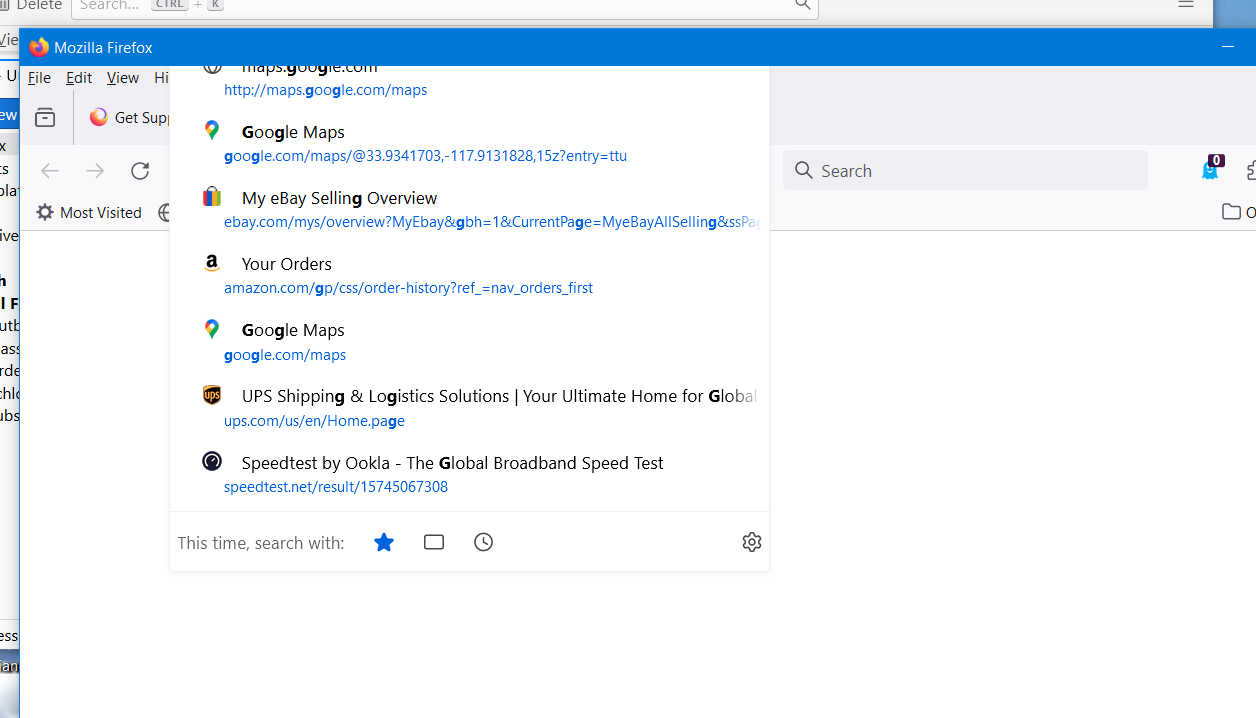
List of suggested sites positioned too high.
Concurrent with updating to Firefox 126.0, when typing into the address bar, the list of suggested sites covers-up the address bar. In fact, the top of the list is off the screen. I don't see any other posts relative to this, am I the only one with this problem... and how do I fix it?
Concurrent with updating to Firefox 126.0, when typing into the address bar, the list of suggested sites covers-up the address bar. In fact, the top of the list is off the screen. I don't see any other posts relative to this, am I the only one with this problem... and how do I fix it?
Alla svar (2)
Vald lösning
It looks like you're using custom userChrome.css modifications. Try to remove it, or at least go to about:config and turn off toolkit.legacyUserProfileCustomizations.stylesheets preference.
By George, TyDraniu, that did the job! Thanks very much. Not sure how that item got changed from False to True, but somehow it had, and resetting to False fixed the issue. Many thanks for the fix and for being so quick about it too! "Long live user groups."