


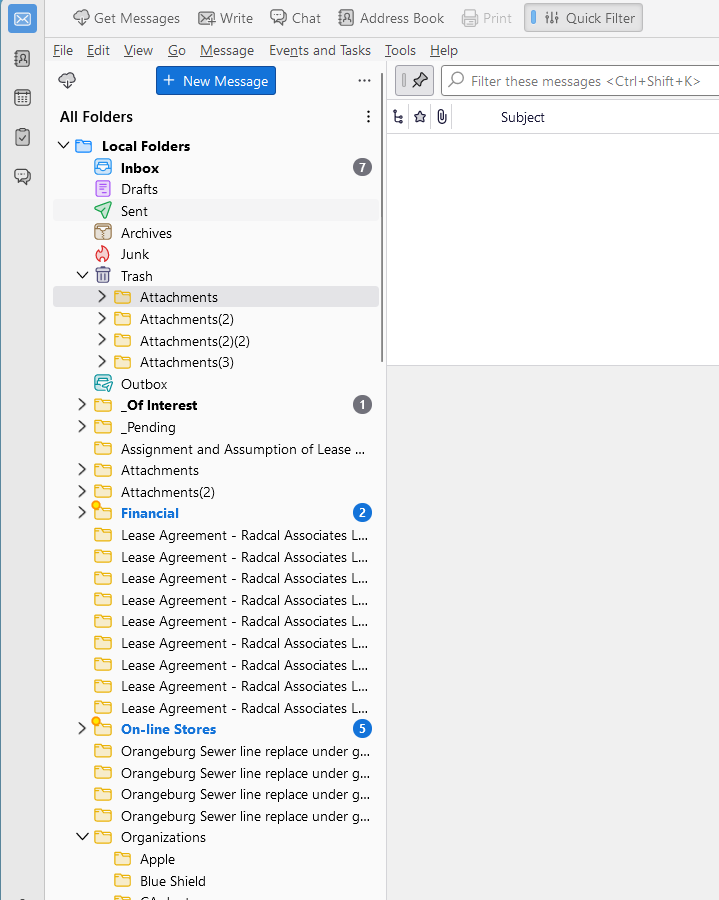
Attachments appear as folders in Local folders.

Attachments to some emails appear as items in the Local Folder list. They reappear after I have deleted them; sometimes I can't delete them at all.
Alla svar (2)
go to the troubleshooting information on the help menu. click on the open button for the profile folder. Close Thunderbird. delete the foldertree file in the profile. Restart Thunderbird.
Things any better?
the problem changed but it's still annoying me. This is what I did: go to the troubleshooting information on the help menu. click on the open button for the profile folder. rename the foldertree.json file in the profile. to foldertreex,json Close Thunderbird. Restart Thunderbird. When I restarted Thunderbird, and opened profile it had recreated the foldetrtree, however the files that I couldn't delete were still there. I could delete many ot them but at least 1 of each of the 3 sticky files could not be deleted.
Ändrad av Gortzh