

Denna tråd har arkiverats.
Ställ en ny fråga om du behöver hjälp.

Arkiverad
Yahoo Mail Font Not Displaying Correctly After Firefox Update.

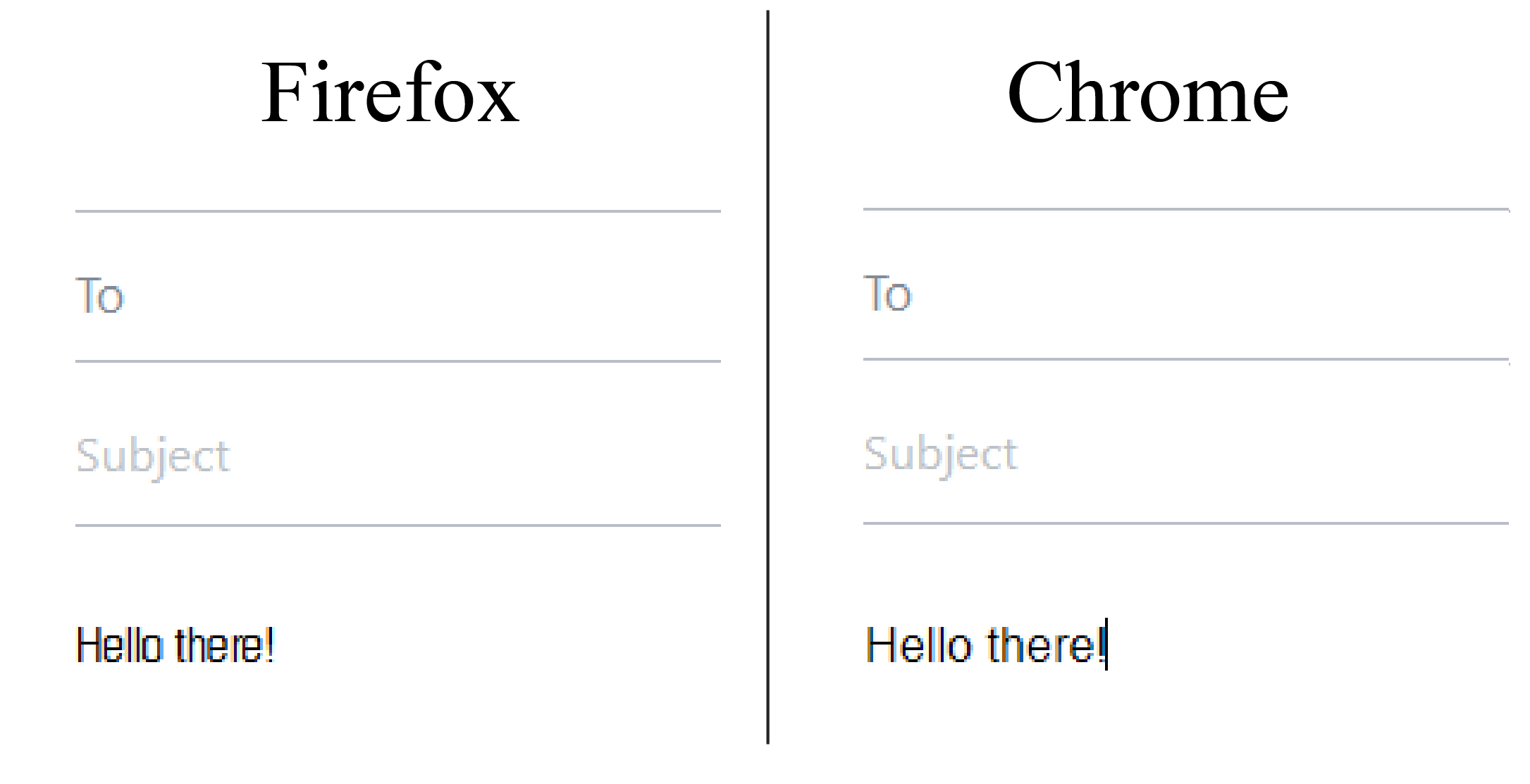
I have my default yahoo mail font set as Modern - Small, but after I updated Firefox, the font displays as if it were Modern Narrow. It displays correctly in other browsers, but not in Firefox. I tried changing the default font in Yahoo Mail Settings. Other fonts work fine, but when I switch back to Modern - Small, it looks very squished.
I have my default yahoo mail font set as Modern - Small, but after I updated Firefox, the font displays as if it were Modern Narrow. It displays correctly in other browsers, but not in Firefox. I tried changing the default font in Yahoo Mail Settings. Other fonts work fine, but when I switch back to Modern - Small, it looks very squished.
Alla svar (1)

Clear the cache and the cookies from sites that cause problems.
"Clear the Cache":
Tools > Options > Advanced > Network > Offline Storage (Cache): "Clear Now"
"Remove Cookies" from sites causing problems:
Tools > Options > Privacy > Cookies: "Show Cookies"
Regards, James