


Thunderbird changes E-Mail signature

Hello,
our company wants to use a better Signature, but every time I send an E-Mail with our new Signature out, the Signature changes. For example, when I send an E-Mail to my Gmail Account.
Attached I send you a screenshot from Thunderbird, how it is intended to look and a screenshot from Gmail, how it does look. I used the Webconsole to check the HTML & CSS Code of the signature in Gmail and can see, that several CSS codes are missing.
To make sure, it's not because of the original code, I added the signature directly to the webmailer of our host and to Outlook and there, the Signature arrives correctly.
Here is the Code I used: https://codefile.io/f/7BzCAjRow1cfGnxDKYMZ
Is there a way to make sure, that the Signature arrives correctly?
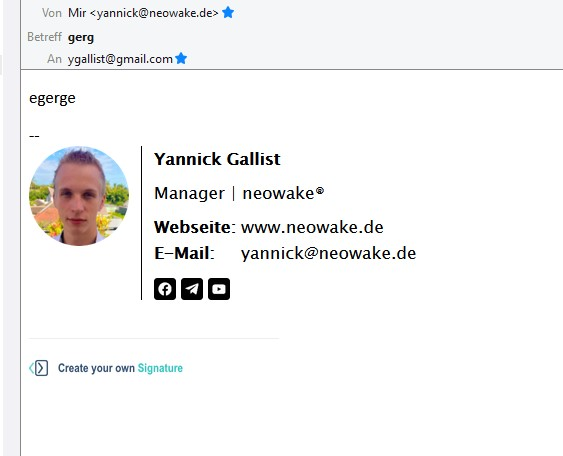
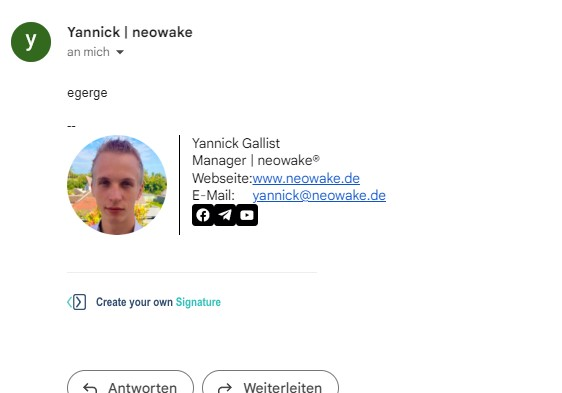
Alla svar (4)
You are aware Gmail strips most CSS code when displaying I assume, and that the use of any css is supported in a particularly spotty way from mail client to mail client. from the look of the images you have used some sort of commercial signature generator. My observation of those is they are particularly poorly tested and often only work with Microsoft Outlook! Or a web browser
You might want to have a look at this information on CSS support from campaign monitor. They make a living composing commercial email https://www.campaignmonitor.com/css/
Thunderbird will not execute scripts, and some HTML5 tags, but I am not a3ware of it actually removing stuff.
Thanks for the quick reply! I used a generator, as my experience in HTML and CSS is limited, yes.
I'll check the site, you recommended, thanks! Although, while trying to find problems with the code in the icons (line 38 to 59 in the code), everything seems to be compatible.
Also, adding the same signature directly to the web mailer of our host or outlook and then sending a mail to Gmail, doesn't change the signature.
Do you have an example of another HTML Signature I can test to see, if I run into the same problem?
Hows about you attach the HTML file generated by your generator to an email and email it to devilsgatedrive at gmail dot com.
That way I will be able to see what I am talking about.
I just send you an E-Mail, thanks!