

Denna tråd har arkiverats.
Ställ en ny fråga om du behöver hjälp.

Löst
Arkiverad
Firefox browser update 98.0 (64bit)

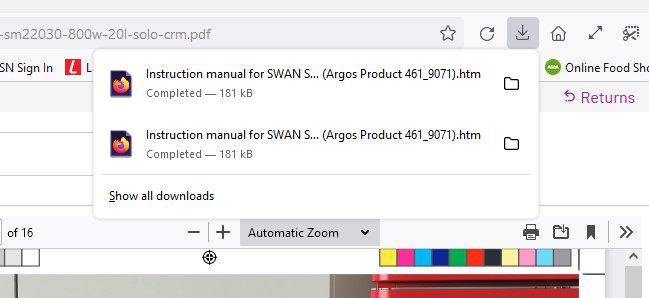
Since firefox updated yesterday to 89.0, files what i download keep popping up on the downloads tab(See Image). How can i turn this off to stop this from happening
Since firefox updated yesterday to 89.0, files what i download keep popping up on the downloads tab(See Image). How can i turn this off to stop this from happening
Alla svar (3)

Vald lösning
https://www.mozilla.org/en-US/firefox/98.0/releasenotes/ Firefox has a new optimized download flow . . . .
https://support.mozilla.org/en-US/kb/manage-downloads-preferences-using-downloads-menu Changes to how file downloads are handled in Firefox version 98
- Firefox no longer asks what to do for each file by default
- Downloads panel automatically opens
- Downloaded files are saved to disk
- Set a default app to open a file type
- "Always Open Similar Files" option from the Downloads panel
- Frequently asked questions
You can set this pref to false on the about:config page to prevent opening the
download panel on each download.
- browser.download.alwaysOpenPanel = false
You can open the about:config page via the location/address bar. You can accept the warning and click "I accept the risk!" to continue.
It works thanks
Glad to help. Safe Surfing.