datepicker
Datepicker displays date yyyy-mm-dd in Firefox 85.0.2 but fails in 86.0
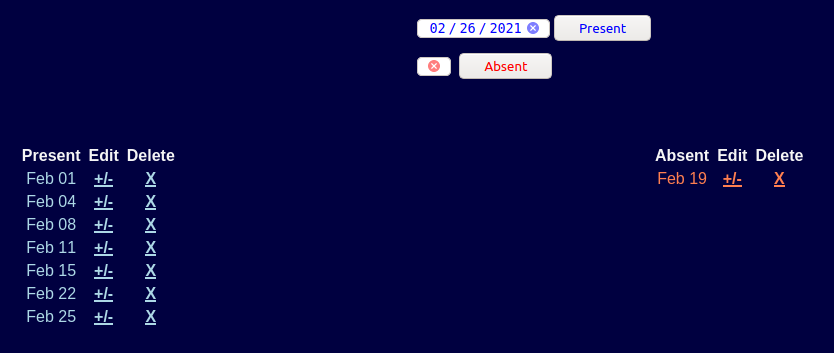
left image is 86, right image is 85
$ uname -a Linux jcn 5.4.0-66-generic #74-Ubuntu SMP Wed Jan 27 22:54:38 UTC 2021 x86_64 x86_64 x86_64 GNU/Linux
$ lsb_release -a No LSB modules are available. Distributor ID: Linuxmint Description: Linux Mint 20.1 Release: 20.1 Codename: ulyssa


Alla svar (2)
Works for me.
Does the demo also fails to work ?
Try the Firefox version from the official Mozilla server if you currently use a version from the repositories of your Linux distribution.
This page is for recording student attendance. The problem was in my style code. In the code blow, I fixed the first table and left the lower table with my original code. The lower table contains width: 20%; in the table style= tag. I removed that, and put both <input>'s in the same <td></td> cell to keep them on the same line.
I had no problem with this code and the width setting in Firefox 85. Is there a change in the "width" tag?
Image below
 <table class="no" style="position: relative; float: left; margin-left: 40%;">
<form action="DateIns.php" method="post">
  <tr>
   <td>
     <input style="color: blue;" type="date" name="Day" value="<?php echo date("Y-m-d") ?>" />
 	  <input style="color: blue;" type="submit" value="Present"/>
   </td>
 	    <td style="visibility: hidden;"><input name="ID" value="<?php echo $ID ?>"/></td>
 	    <td style="visibility: hidden;"><input name="Status" value="Present"/></td>
  </tr>
</form>
</table>
 <table class="no" style="position: relative; float: left; margin-left: 40%; width: 20%;">
<form action="DateIns.php" method="post">
  <tr>
   <td>
    <input style="color: red;" type="date" name="Day" value="<?php echo date("Y-m-d") ?>" />
   </td>
   <td><input style="color: red;" type="submit" value="Absent"/>
 	</td>
 	    <td style="visibility: hidden;"><input name="ID" value="<?php echo $ID ?>"/></td>
 	    <td style="visibility: hidden;"><input name="Status" value="Absent"/></td>
  </tr>
</form>
</table>