


change Library colours

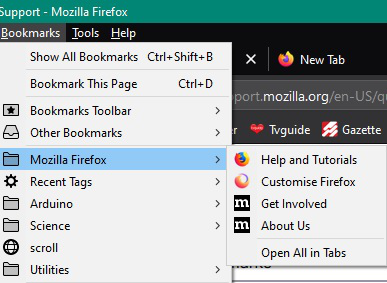
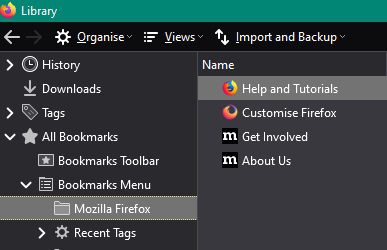
For some reason my "bookmarks/show all bookmarks" has flipped colours and is now white text with dark background (it wasn't like it 2 days ago). All other bookmark 'stuff' is normal. Changing the text/background works for everything else.
Update: (and title changed) To be clear, this affects the new window called "library", which opens with Ctrl-Shift-B or Ctrl-Shift-H, not any toolbars on the main Firefox screen. Changing themes does not affect
Ändrad av Chadwell
Alla svar (2)
hello chadwell
follow the steps and instruction your problem is solved easily :
Installing a theme (AKA lightweight theme, persona) is another simple option.
* https://addons.mozilla.org/firefox/themes/solid
If you still want to go the user style route, choose either style below.
- The first will only change the text color for the Bookmarks Toolbar Items element so that it matches the menu bar text color.
- The second affects the whole menu bar and the tab bar I don't think the latter looks that good because it also affects the top window border and the Minimize/Maximize/Close buttons remain blue.
1) Install Stylish and restart Firefox when prompted.
* https://addons.mozilla.org/firefox/addon/stylish/
2) Click the ≡ Menu Button and choose Add-ons.
3) In the Add-ons Manager, click User Styles on the left.
4) Click the Write New Style button at the top.
Paste the following in the text box, give the style a name, then click the Save button.
@namespace url(http://www.mozilla.org/keymaster/gatekeeper/there.is.only.xul);
toolbar-menubar .toolbarbutton-text { color: rgb(216,228,248) !important; }
@namespace url(http://www.mozilla.org/keymaster/gatekeeper/there.is.only.xul);
navigator-toolbox {
background-color: rgb(236, 233, 216) !important;
background-image: linear-gradient(to top, rgba(10, 31, 51, 0.35) 2px, rgba(0, 0, 0, 0.05) 2px, transparent 50%) !important;
}
.menubar-text,
toolbar-menubar .toolbarbutton-text,
.tabbrowser-tab .tab-label {
color: black !important;
}
- main-menubar menu:hover .menubar-text {
color: white !important;
}
If you don't want to install an add-on, you can use the userChrome.css file instead, but I don't recommend it.
http://kb.mozillazine.org/UserChrome.css
i hope resolved your problem then reply back to me.
thank you!
Sorry that's not doing it, to be clear, it's the "show all bookmarks" [Ctrl shift B] library window that is affected
Ändrad av Chadwell