Bookmarking
Something has changed. Now when I bookmark a site, I have to go back in to bookmarks to edit it and put it where I want it. Why do I have to do this in two steps? Why would anyone want a vast list of bookmarks in no order? The Fox needs to change it back. Ok, now tell me I'm doing is wrong so I can fix it... Thanks, Jan
Something has changed. Now when I bookmark a site, I have to go back in to bookmarks to edit it and put it where I want it. Why do I have to do this in two steps? Why would anyone want a vast list of bookmarks in no order? The Fox needs to change it back.
Ok, now tell me I'm doing is wrong so I can fix it...
Thanks, Jan
Vald lösning
Hello,
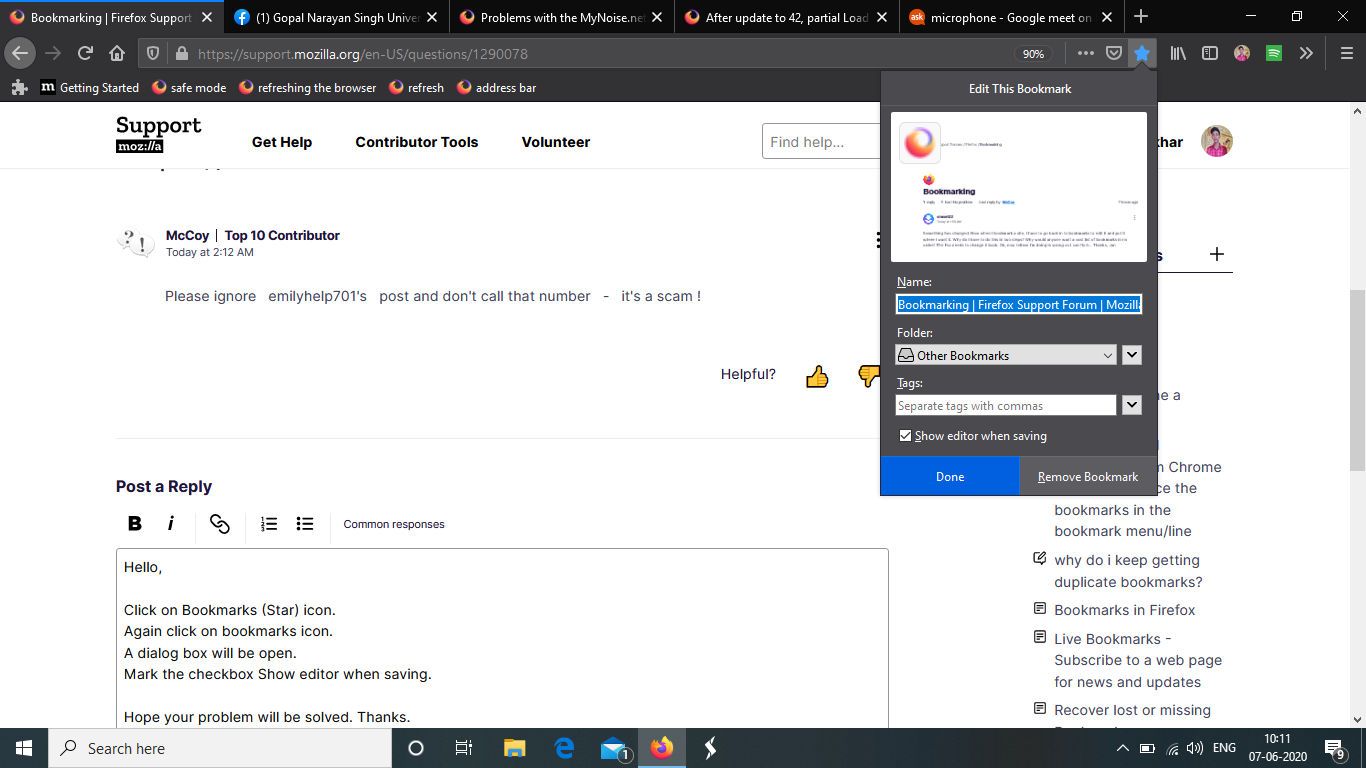
- Click on Bookmarks (Star) icon.
- Again click on bookmarks icon.
- A dialog box will be open.
- Mark the checkbox Show editor when saving.
Hope your problem will be solved. Thanks.
Läs svaret i sitt sammanhang 👍 0Alla svar (2)
Please ignore emilyhelp701's post and don't call that number - it's a scam !
Vald lösning
Hello,
- Click on Bookmarks (Star) icon.
- Again click on bookmarks icon.
- A dialog box will be open.
- Mark the checkbox Show editor when saving.
Hope your problem will be solved. Thanks.