


Disable Web Push Notification Icon completely
I've read this article: https://support.mozilla.org/en-US/kb/push-notifications-firefox
It tells me how to disable new notification requests, however when I go to website, the icon still appears. The icon still wiggles. I want to remove this ENTIRELY. Under no circumstances do I ever want to know anything about any website with notifications. It should be 100% removed because it is trash feature from trash companies.
Vald lösning
Is this about push notification that use a service worker to enable receiving notifications in the background or about other types of notification ?
Some related prefs on the about:config page:
Global setting Push notifications: dom.push.enabled
Global setting Web notifications: dom.webnotifications.enabled and dom.webnotifications.serviceworker.enabled
Global setting Desktop: notification.feature.enabled
Läs svaret i sitt sammanhang 👍 1
Alla svar (7)
Hi NotificationsSuck, glad to see you on Mozilla Support Forum.
You can completely disable notifications from websites by following steps:-
- Click the menu button and select Options.
- Click Privacy & Security from the left pane.
- Scroll to the Permissions section.
- Click the Settings button to the right of Notifications.
- Select the Block new requests asking to allow notifications checkbox.
- Click the Save Changes button.
If it doesn't solved your problem, then feel free to ask in Reply Section. Thanks for raising your question in Mozilla Support Forum.
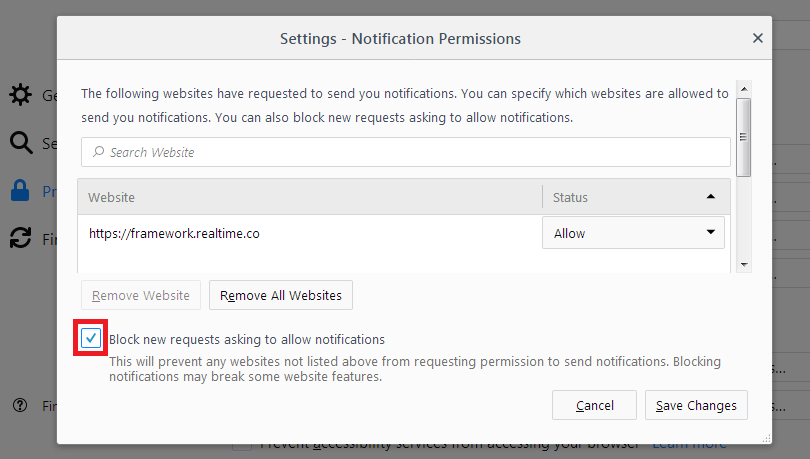
Maybe you should read my post before replying.
This is straight from the support article, which I followed.
I still get the bouncy notification bubble in the address bar. I don't want that. When I set block new requests, I should never ever see that icon in the URL bar.
Vald lösning
Is this about push notification that use a service worker to enable receiving notifications in the background or about other types of notification ?
Some related prefs on the about:config page:
Global setting Push notifications: dom.push.enabled
Global setting Web notifications: dom.webnotifications.enabled and dom.webnotifications.serviceworker.enabled
Global setting Desktop: notification.feature.enabled
Hi NotificationsSuck, that checkbox originally suppressed a drop-down, but now it seems there's never a drop-down, so I don't know whether it has any meaning any more.
You could try the preferences cor-el mentioned to disable notifications (i.e., not just the permission drop-down/icon).
If you decide not to do that, you can at least tame the wiggling of permission icons as follows:
(1) In a new tab, type or paste about:config in the address bar and press Enter/Return. Click the button accepting the risk.
(2) In the search box in the page, type or paste animate and pause while the list is filtered
(3) Double-click the permissions.postPrompt.animate preference to switch the value from true to false
(More info on about:config: Configuration Editor for Firefox.)
You can also suppress some animations via toolkit.cosmeticAnimations.enabled = false.
Ändrad av cor-el
cor-el said
Is this about push notification that use a service worker to enable receiving notifications in the background or about other types of notification ? Some related prefs on the about:config page: Global setting Push notifications: dom.push.enabled Global setting Web notifications: dom.webnotifications.enabled and dom.webnotifications.serviceworker.enabled Global setting Desktop: notification.feature.enabled
Looks like these settings finally did it. I don't know if it's the combination of these, or if it's an individual one, but I finally no longer have that god awful absolute trash icon in my address bar.
Thank you.

None of this worked for me. I want to trash the icon and everything it does. Gone. Never see it.
New releases bring new problems, eh wot ? There's always something...