


How to get rid of blue onboarding message box and icon on a new tab?

In a new tab there's an annoying Firefox logo and blue box that says "Firefox is all new. See what you can do". I clicked it and did the tour, and then customized my new tab preferences, but it remains on every new tab.
How do I make it go away? There doesn't seem to be a preference to remove it.
Ändrad av jhgarrison
Vald lösning
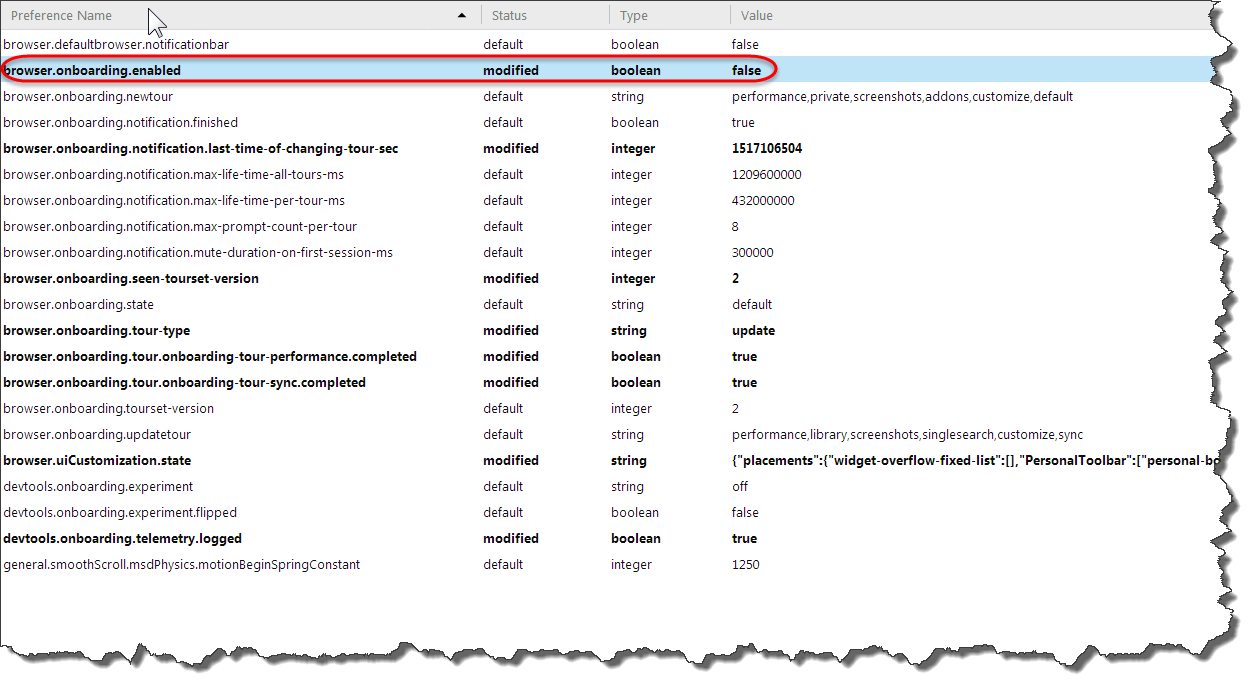
Figured it out. The name of the icon onboarding-overlay-button-icon suggested I should look in about:config for the word "onboard", which led to the option browser.onboarding.enabled. Setting that to `false` removed the blue box and icon.
Should the onboarding get disabled once you've clicked on the tour?
Does this need to have a bug filed?
Ändrad av jhgarrison
Alla svar (4)

Screen of what your talking about?
Click on the "gear" in the upper-right corner of the New Tab page and deselect Snippets at the bottom of the New Tab Preferences - Choose what you see on this page list.
I already have Snippets disabled. In fact I have everything disabled. I've attached a screenshot.
Curiously, if I make the Firefox window small enough the blue box and logo disappear. As I reduce the width, first the box disappears and is replaced with a blue dot at the top right of the icon. If I continue reducing the width, as I get to around 960px (width of the content area), the icon disappears. Since my monitors are both 2560x1440 I usually have Firefox a lot wider than that.
Ctrl+U (View Source) on the new tab shows nothing interesting, but opening the Developer Tools shows this:
   ...
 <body class="activity-stream">
   <button aria-label="Firefox is all new. See what you can do!" id="onboarding-overlay-button" aria-haspopup="true" aria-controls="onboarding-overlay-dialog" class="onboarding-speech-bubble">
     <img id="onboarding-overlay-button-icon" role="presentation" src="chrome://branding/content/icon64.png">
     <img id="onboarding-overlay-button-watermark-icon" role="presentation" src="resource://onboarding/img/watermark.svg">
   </button>
   ...

Ändrad av jhgarrison
Vald lösning
Figured it out. The name of the icon onboarding-overlay-button-icon suggested I should look in about:config for the word "onboard", which led to the option browser.onboarding.enabled. Setting that to `false` removed the blue box and icon.
Should the onboarding get disabled once you've clicked on the tour?
Does this need to have a bug filed?
Ändrad av jhgarrison