Denna tråd har arkiverats.
Ställ en ny fråga om du behöver hjälp.

Löst
Arkiverad
The calendar doesn't allow entering the desired event starting and ending times.

It automatically changes the ending time to one hour after the starting time, or to make it identical to the starting time. Same thing if entering an ending time, it automatically changes the starting time.
It automatically changes the ending time to one hour after the starting time, or to make it identical to the starting time. Same thing if entering an ending time, it automatically changes the starting time.
Alla svar (1)
Vald lösning
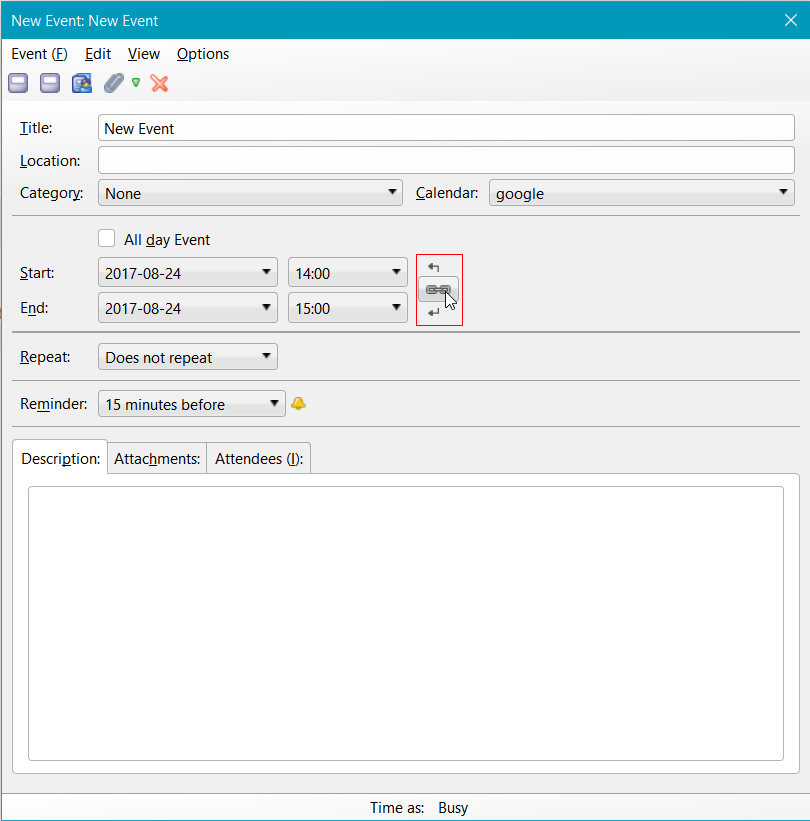
There is a chain link symbol linking the start and end time boxes. When enabled, it makes the two track by the default difference you enter into the settings. Disable it by clicking and you can set the two independently.