


Firefox wont allow me to update adobe shockwave

shockwave crashes always..tried to update ap but wont let me .....I am faithful to firefox ... but
Vald lösning
There is an easier built-in way to disable the protected mode feature of the Flash player plugin -- using the Add-ons page. Either:
- Ctrl+Shift+a
- "3-bar" menu button (or Tools menu) > Add-ons
In the left column, click Plugins. On the right side, find "Shockwave Flash" and click the More link. Then uncheck the box for "Enable Adobe Flash protected mode" and try that for a day to see whether it helps.
Läs svaret i sitt sammanhang 👍 8Alla svar (5)

Your system details shows you have the current flash.
If you have problems with current Shockwave Flash plugin versions then check this:
- see if there are updates for your graphics drivers
https://support.mozilla.org/kb/upgrade-graphics-drivers-use-hardware-acceleration
- disable protected mode in the Flash plugin (Flash 11.3+ on Windows Vista and later)
https://forums.adobe.com/message/4468493#TemporaryWorkaround
- disable hardware acceleration in the Flash plugin
https://forums.adobe.com/thread/891337 See also:
Vald lösning
There is an easier built-in way to disable the protected mode feature of the Flash player plugin -- using the Add-ons page. Either:
- Ctrl+Shift+a
- "3-bar" menu button (or Tools menu) > Add-ons
In the left column, click Plugins. On the right side, find "Shockwave Flash" and click the More link. Then uncheck the box for "Enable Adobe Flash protected mode" and try that for a day to see whether it helps.
jscher2000 ...perfect .. thanks so much ...hasn't crashed since ..
Hastings2 said
shockwave crashes always..tried to update ap but wont let me .....I am faithful to firefox ... but
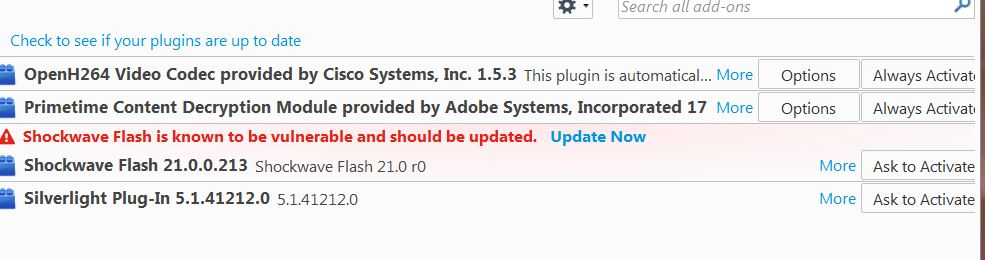
I am unable to get firefox to know that I HAVE updated Shockwave flash (3 times even)... I cannot access the protection mode thing, it doesn't show on right side when I click more. I've gone in some crazy circles trying to figure this out. My problem started when I could not play youtube videos in Facebook... but can play them AT youtube (in firefox) ... but also other videos DO play. I am not sure (at this point) what the exact problem is... but I know I DO want to solve this flash problem, and none of the solutions I've tried have helped.
dianamite Please go to the top of any support.mozilla.org web page and use the Ask A Question link; https://support.mozilla.org/en-US/questions/new This will let us look at your system details. No Personal Information Is Collected.