


Why does firefox automatically change the URLs to sites when I enter the correct URL manually?

Lately, I've noticed when I go to a bookmarked page, or sometimes, when I enter the URL manually, the address bar displays something that's added onto the beginning of the URL. It doesn't matter whether I'm using it from my desktop or my laptop, and it doesn't matter whether I'm using my internet connection at home or somewhere else.
For example, if I want to go to amazon.com, and type that into the address bar, it automatically displays this:
http://##.##.#.###/bg/VRF-Voice-migration/index.html?policy=1725&url=http://www.amazon.com/
where the number at the beginning will be my current IP address. The page title always displays as "Bulletin" instead of the normal page title. I'm wondering why it's doing this and, if possible, how I can disable whatever is doing it.
Alla svar (2)
That's very troubling.
Do you see the same behavior in other browsers, such as Internet Explorer or Chrome?
Can you think of any software you run that would be proxying your internet access?
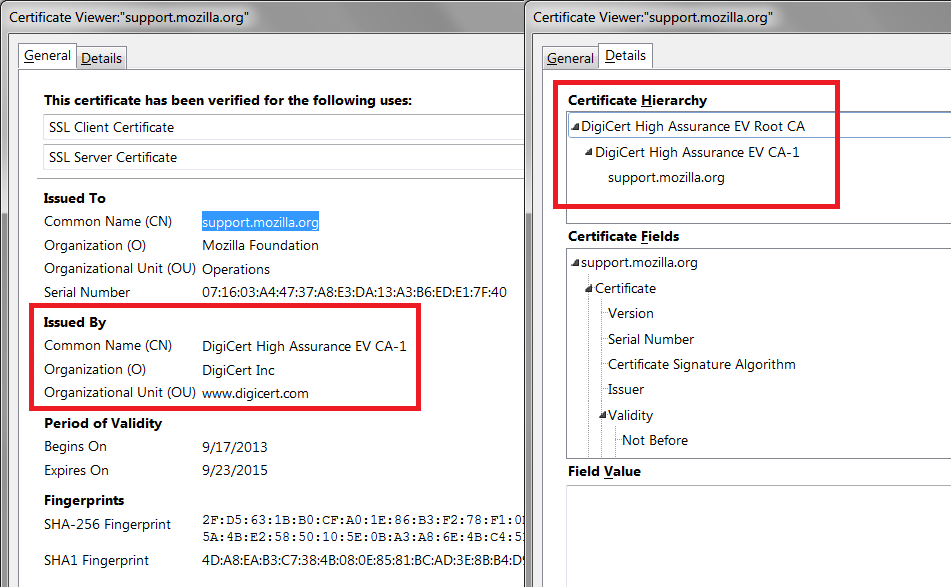
Does it matter whether it is an HTTPS page instead of an HTTP page? If the same happens on an HTTPS page, could you check the certificate issuer to see whether that points to an intermediary? You can click the padlock icon in the address bar, then More Information, then View Certificate. For this site, for example, you can compare with the attached screen shot.

Start Firefox in Safe Mode {web Link} by holding down the <Shift>
(Mac Options) key, and then starting Firefox. Is the problem still there?