


How to change the size of youtube play/pause and progress bar?

I have windows 8 and on internet explorer (hah), youtube videos play fine there. However, when I use Firefox, the display below videos showing the progress bar and play/pause decreases in size immensely. Is there a solution to this? This also applies to other videos on websites such as twitch, but not vimeo. I have tried changing font size to no avail, but I am relatively new to Windows (a Mac convert) and don't know the full options.
Alla svar (4)
Do you have a very high resolution display? I think users with full HD or higher resolution have reported this problem in past threads. Unfortunately, I don't recall there being a solution, but someone should take a fresh look at it.
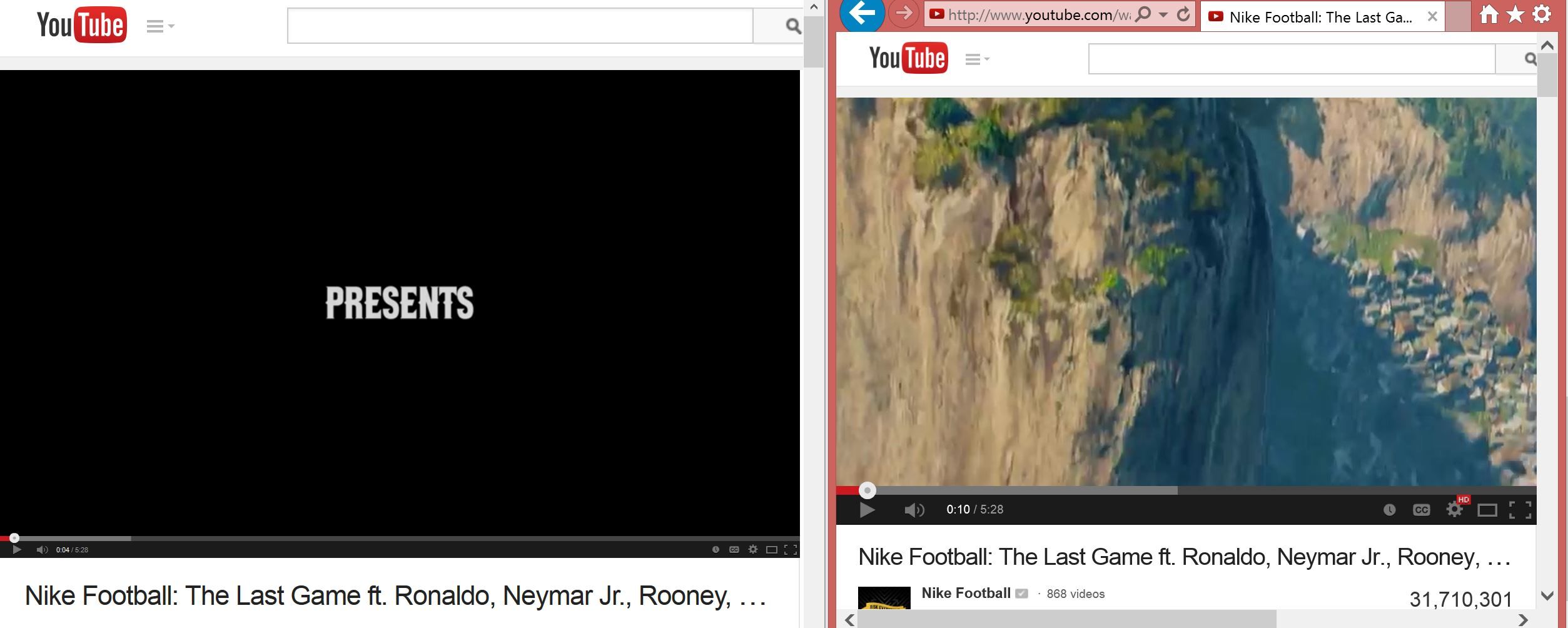
I do have a hi-res display, I never thought about that. I am just wondering about the discrepency between Firefox and IE though. That is what truly puzzles me. Hopefully someone will take a fresh look at it! I attached images below showing the difference. On the left is firefox and on the right is Internet Explorer. Same video, different sizes.
Here's the earlier thread I remembered: Playback controls on YouTube and other video players are tiny.
Since this seems to particularly afflict the Lenovo Yoga 2 (3200x1800) I took a quick look at Lenovo's forums, but didn't immediately find a solution. I should check Adobe's forums...
I talked to Lenovo support and found the solution! Download the Youtube Center Add on to Firefox. https://addons.mozilla.org/en-US/firefox/addon/youtube-center/
Then, click "Player" and change the Player Type to HTML5. Go to "Player Size" next (still under Player) and change the default to "Small". It works! If the other thread didn't get sufficiently solve,d feel free to link to this. I don't want to necro the thread though.
Thanks to jscher2000 though!