


Windows 10 reached EOS (end of support) on October 14, 2025. For more information, see this article.

Kërkoni te Asistenca

Shmangni karremëzime gjoja asistence. S’do t’ju kërkojmë kurrë të bëni një thirrje apo të dërgoni tekst te një numër telefoni, apo të na jepni të dhëna personale. Ju lutemi, raportoni veprimtari të dyshimtë duke përdorur mundësinë “Raportoni Abuzim”.

Mësoni Më Tepër

Trouble subscribing to astronomy web calendar in Thunderbird 146.0 (Mac OSX Tahoe 26.1)

  • Pa përgjigje
  • 0 e kanë hasur këtë problem
  • 23 parje
more options

Hello, I just upgraded to a new mac and installed a fresh download of Thunderbird. Things are working well except for trouble subscribing to this astronomy calendar: https://cantonbecker.com/astronomy-calendar/astrocal.ics It works OK on my old mac/Thunderbird setup, but not on the new setup.

Details: New system, where the astrocal calendar doesn't work: MacBook Air M4 2025, running MacOS Tahoe 26.1, Thunderbird 146.0

Old system, where the astrocal calendar works: MacBook Air Intel i5 2017, running MacOS High Sierra 10.13.6, Thunderbird 115.10.1 (64 bit)

My steps to subscribe are Event and Tasks tab click Calendar On the bottom left I click New Calendar This opens a Create new Calendar window. Click On the network, Next I select "This location doesn't require credentials" and "Offline support" I fill in the URL: https://cantonbecker.com/astronomy-calendar/astrocal.ics, then click Find Calendars At this point on the new Thunderbird I get the error: Could not find calendars at this location. Please check your settings. (screenshot) But on the old Thunderbird I get that astrocal is available, and it actually works.

Any ideas? Is it a bug in the latest version of Thunderbird?

Thanks,

Peter H. PS: The new mac's default Calendar app subscribes to the astrocal calendar OK. It's just the new Thunderbird that has trouble. PPS: The new Thunderbird does successfully subscribe to another calendar, of Japanese holidays https://ics.calendarlabs.com/54/44bd6152/Japan_Holidays.ics That makes me more confused as to where the problem lies.
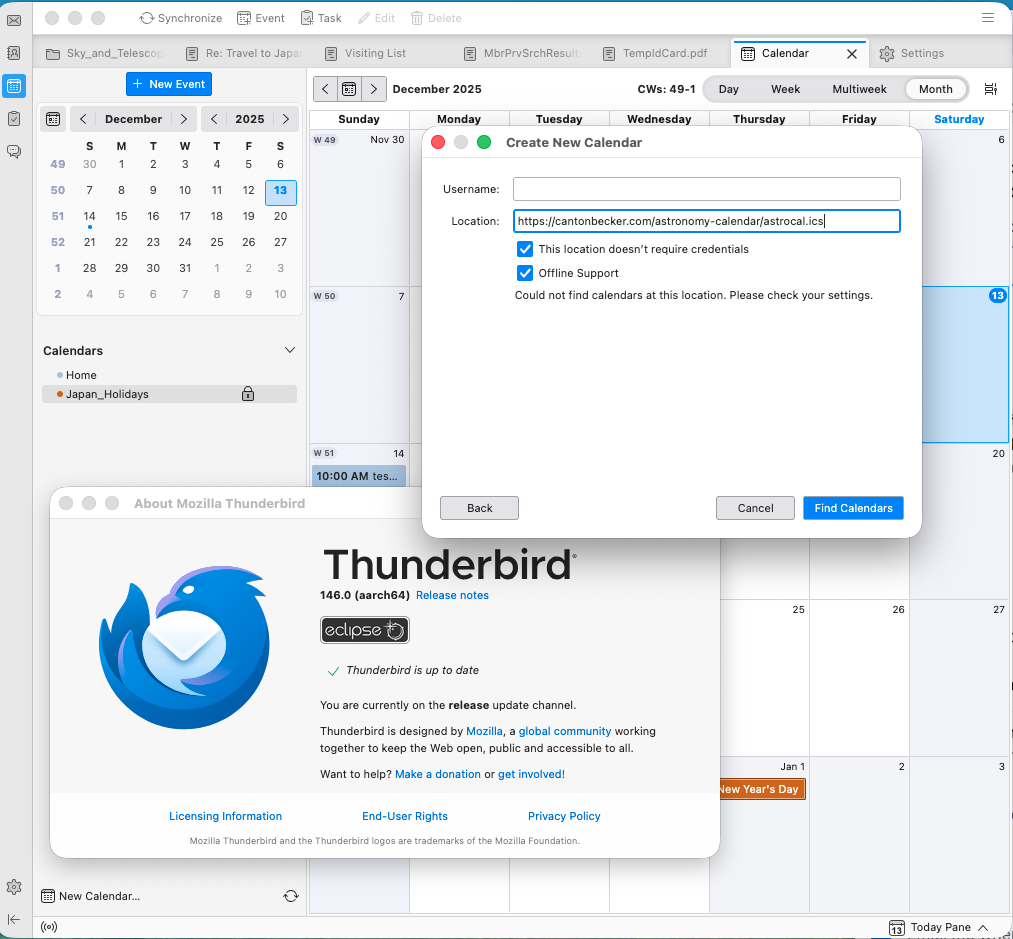
Hello, I just upgraded to a new mac and installed a fresh download of Thunderbird. Things are working well except for trouble subscribing to this astronomy calendar: https://cantonbecker.com/astronomy-calendar/astrocal.ics It works OK on my old mac/Thunderbird setup, but not on the new setup. Details: New system, where the astrocal calendar doesn't work: MacBook Air M4 2025, running MacOS Tahoe 26.1, Thunderbird 146.0 Old system, where the astrocal calendar works: MacBook Air Intel i5 2017, running MacOS High Sierra 10.13.6, Thunderbird 115.10.1 (64 bit) My steps to subscribe are Event and Tasks tab click Calendar On the bottom left I click New Calendar This opens a Create new Calendar window. Click On the network, Next I select "This location doesn't require credentials" and "Offline support" I fill in the URL: https://cantonbecker.com/astronomy-calendar/astrocal.ics, then click Find Calendars At this point on the new Thunderbird I get the error: Could not find calendars at this location. Please check your settings. (screenshot) But on the old Thunderbird I get that astrocal is available, and it actually works. Any ideas? Is it a bug in the latest version of Thunderbird? Thanks, Peter H. PS: The new mac's default Calendar app subscribes to the astrocal calendar OK. It's just the new Thunderbird that has trouble. PPS: The new Thunderbird does successfully subscribe to another calendar, of Japanese holidays https://ics.calendarlabs.com/54/44bd6152/Japan_Holidays.ics That makes me more confused as to where the problem lies.
Foto të bashkëngjitura ekrani

Duhet të bëni hyrjen te llogaria juaj që t’i përgjigjeni postimeve. Ju lutemi, filloni me një pyetje të re, nëse nuk keni ende një llogari.