


Windows 10 reached EOS (end of support) on October 14, 2025. If you are on Windows 10, see this article.

Vyhľadajte odpoveď

Vyhnite sa podvodom s podporou. Nikdy vás nebudeme žiadať, aby ste zavolali alebo poslali SMS na telefónne číslo alebo zdieľali osobné informácie. Nahláste prosím podozrivú aktivitu použitím voľby “Nahlásiť zneužitie”.

Ďalšie informácie
Solved

Firefox ignores css style for hamburger menu after updating from 150.0.3 to 151

Piterk odpovedal
Piterk

I have custom userChrome file that made my history and hamburger menu (application menu / settings) text and distances smaller since Firefox introduced this ugly feature, trying to be cool in windows 10 times. Nowadays even windows 11 brings back compact mode but firefox still uses huge spacing. I just fixed issue with custom CSS and forgot about it. Unfortunately, after updating to FF 151, my CSS is ignored and I am forced to new ugly context menu. What is weird, I still have good small pacing when right-clicking pages, UI elements and when I enter bookmarks. Only places that ignore my CSS are hamburger menu for settings and list under history view. I do not really understand this code, I just copied it from someone else. Can someone help me fix this issue?

menupopup > menu, menupopup > menuitem{ padding-block: 3px !important; min-height: 0px !important; }

root{

--arrowpanel-menuitem-padding: 0px !important; }
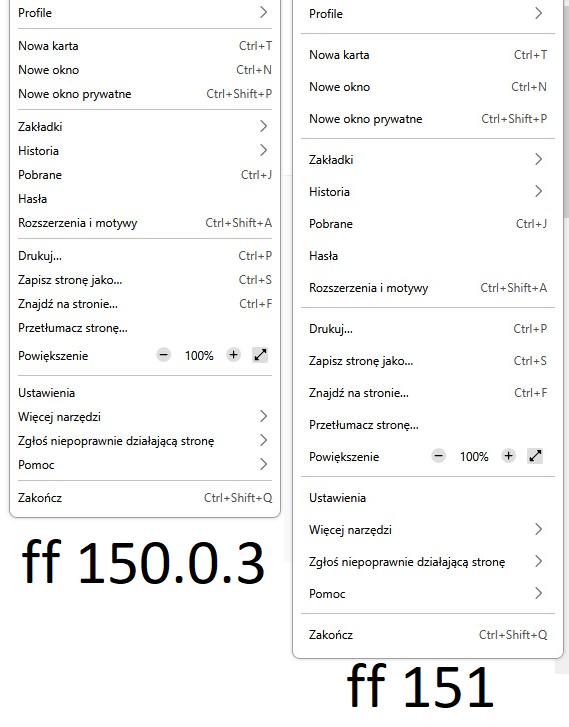
I have custom userChrome file that made my history and hamburger menu (application menu / settings) text and distances smaller since Firefox introduced this ugly feature, trying to be cool in windows 10 times. Nowadays even windows 11 brings back compact mode but firefox still uses huge spacing. I just fixed issue with custom CSS and forgot about it. Unfortunately, '''after updating to FF 151, my CSS is ignored and I am forced to new ugly context menu'''. What is weird, '''I still have good small pacing when right-clicking pages, UI elements and when I enter bookmarks. Only places that ignore my CSS are hamburger menu for settings and list under history view'''. I do not really understand this code, I just copied it from someone else. Can someone help me fix this issue? menupopup > menu, menupopup > menuitem{ padding-block: 3px !important; min-height: 0px !important; } :root{ --arrowpanel-menuitem-padding: 0px !important; }
Priložené obrázky

Upravil(a) Piterk dňa

Všetky odpovede (1)

Vybrané riešenie

nevermind, I found solution on reddit. Just replace --arrowpanel-menuitem-padding: 0px !important; with: --panel-menuitem-padding: 0px !important;

Upravil(a) Piterk dňa

Položiť otázku

Ak chcete odpovedať na príspevky, musíte sa prihlásiť do svojho účtu. Ak ešte nemáte účet, položte novú otázku.