


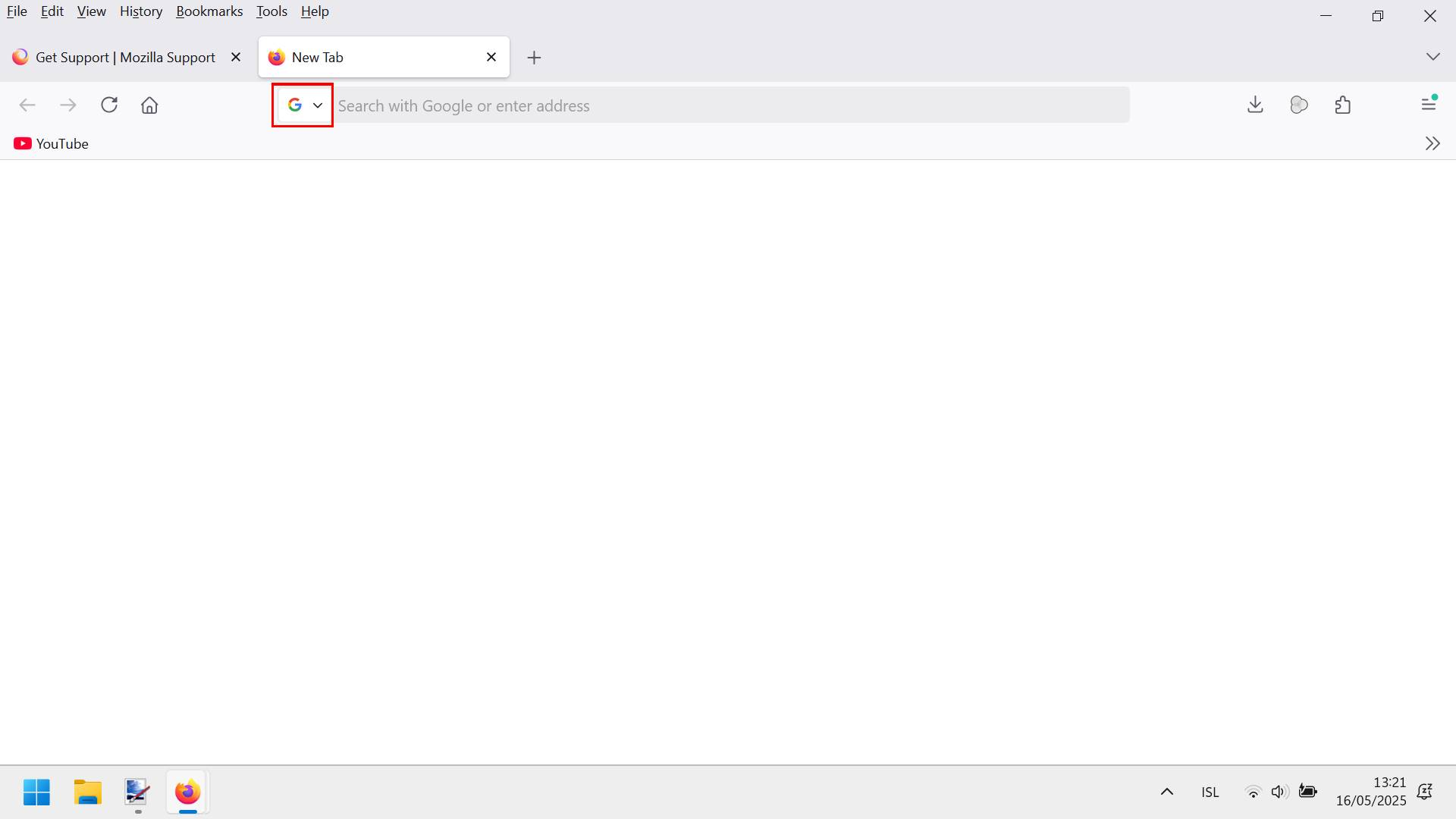
Turn off search bar icon ?

I want to turn off a recently added search bar icon in the new version of the newest version of firefox ? I only use google and don't have other search functions enabled but i dont like seeing this icon that suddenly appeared without warning ?
It is too distracting.
Vybrané riešenie
About your initial subject. Try 1 - Go to Configuration Editor for Firefox https://support.mozilla.org/en-US/kb/about-config-editor-firefox 2 - Enter a search term browser.urlbar.scotchBonnet.enableOverride To change a boolean (true-false) preference's value, double-click on the preference.
Všetky odpovede (11)
Hello
https://connect.mozilla.org/t5/discussions/address-bar-updates-now-live-in-firefox-nightly/m-p/77329/highlight/true#M29547 below if you wish to test a userChrome.css file
#urlbar-searchmode-switcher{display:none!important;}
Agent virtuel said
Hello https://connect.mozilla.org/t5/discussions/address-bar-updates-now-live-in-firefox-nightly/m-p/77329/highlight/true#M29547 below if you wish to test a userChrome.css file#urlbar-searchmode-switcher{display:none!important;}
Is there a easier way to disable it like in about:config coding ?
Apparently, you are under Studies https://support.mozilla.org/en-US/kb/shield
Type about:studies into your address bar to see a list of your studies. Click the Remove button next to the study you want to opt out of.
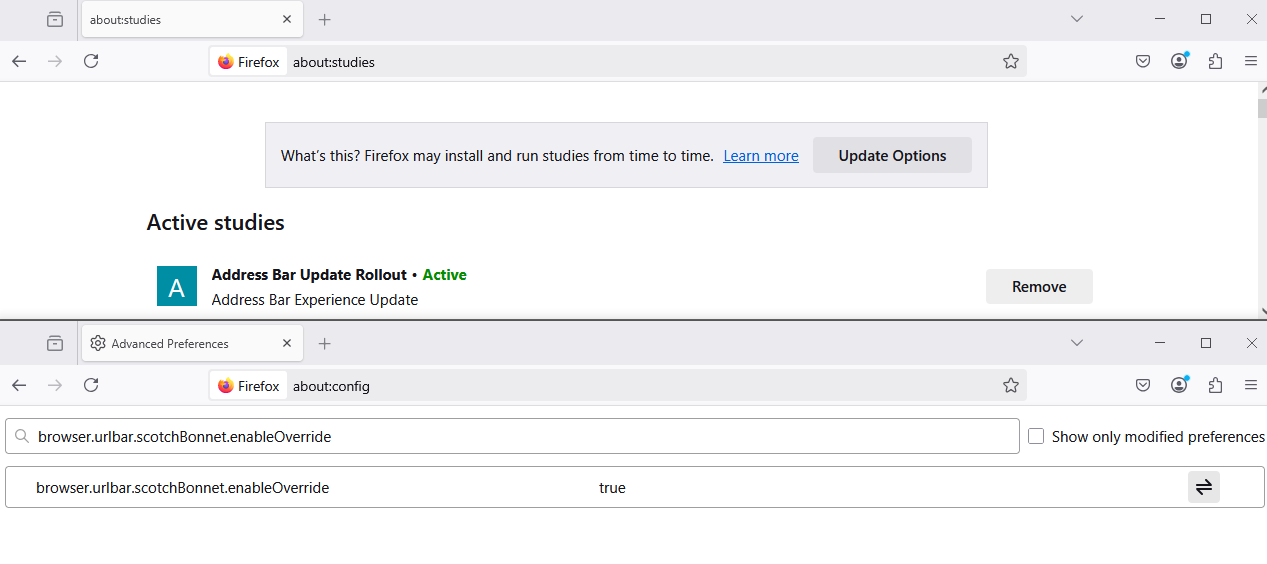
Unchecking all of the studies to be sure did not work and the first topic did not work. These solutions are flawed or outdated after update 138.0.3 64-Bit windows 11
The problem persist in new tabs clicking. I even rebooted my pc.
Upravil(a) kstanni87 dňa
About the code of userChrome.css file, it works.
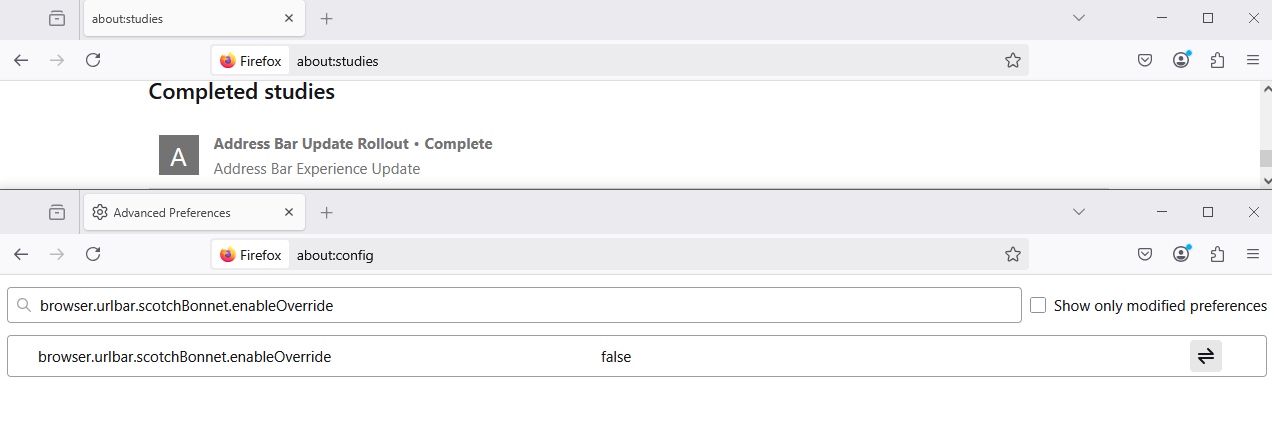
About Completed studies, it works.
Address Bar Update Rollout•Complete Address Bar Experience UpdateYou find the old behavior.
Just read all of them. Tried to find studies in settings.
And all of them still don't work including a command in about:config named app.shield.optoutstudies.enabled set to true. did not work
Upravil(a) kstanni87 dňa
Vybrané riešenie
About your initial subject. Try 1 - Go to Configuration Editor for Firefox https://support.mozilla.org/en-US/kb/about-config-editor-firefox 2 - Enter a search term browser.urlbar.scotchBonnet.enableOverride To change a boolean (true-false) preference's value, double-click on the preference.
It's finally over, looks like a second pc restart unclogged it and it's fixed started working.
The problem is back after the newest update it happens in new tab/about:blank
edit: oops, nevermind the new post, had to re-enable the browser.urlbar.scotchBonnet.enableOverride command and set to false.
looks like every update flips/reverts this user change.
Upravil(a) kstanni87 dňa
Hello
For information purposes, https://connect.mozilla.org/t5/discussions/address-bar-updates-now-live-in-firefox-nightly/m-p/96548/highlight/true#M37684
Agent virtuel said
Hello For information purposes, https://connect.mozilla.org/t5/discussions/address-bar-updates-now-live-in-firefox-nightly/m-p/96548/highlight/true#M37684
I already made that one with scotchbonnet line. I'm saying that in the new update 138.0.4...the browser secretly attempted to revert this new setting. I had to set it to false again.
Upravil(a) kstanni87 dňa