


using 153.0.3 (64-bit) and inbox disappears

using 153.0.3 (64-bit) and inbox disappears occasionally. i can recover by navigating to another tab and then returning
All Replies (3)
A screen shot of your Thunderbird window when the Inbox folder is "missing" would be helpful. I presume that you open messages in new tabs without closing the tabs after having read the messages. After a while the tab bar displays so many tabs that the "mail tab" with accounts and folders disappears on the left corner of the tab bar since all new tabs are added at th right corner of the tab bar. If you want to return to the Inbox folder(s) in the mail tab click on downward arrow v in the right corner and select Inbox in the list of open tabs. Or simple hit the Ctrl +1 keyboard shortcut ...
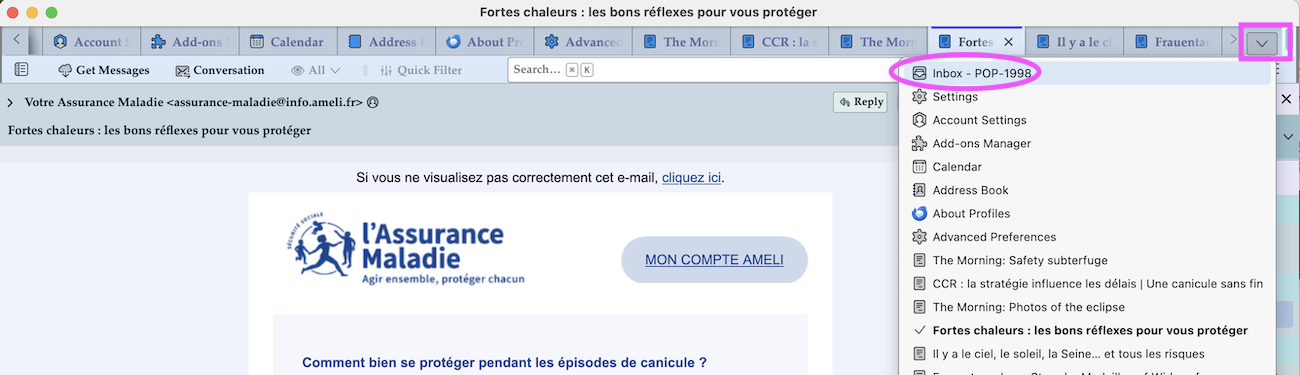
Thanks for your quick response! i don't leave many tabs open, so understand your explanation, but it happens when i may only have the inbox and sent tabs open. i can take a screen shot the next time it happens
If you open folders like Inbox or Sent in new tabs and from there you open a message in a new tab you will no longer see the folder pane in the new message tabs.