This thread was archived.
Please ask a new question if you need help.

Archived
sorting email in box

Is it possible to have the option to sort emails in sender block so that you can then delete a whole block of emails from a sender, For example under Sportscraft you might have all the emails from sportscraft and then pressing delete on the one header deletes all from sportscraft under that header. Thanks Bev
Is it possible to have the option to sort emails in sender block so that you can then delete a whole block of emails from a sender, For example under Sportscraft you might have all the emails from sportscraft and then pressing delete on the one header deletes all from sportscraft under that header.
Thanks Bev
All Replies (1)

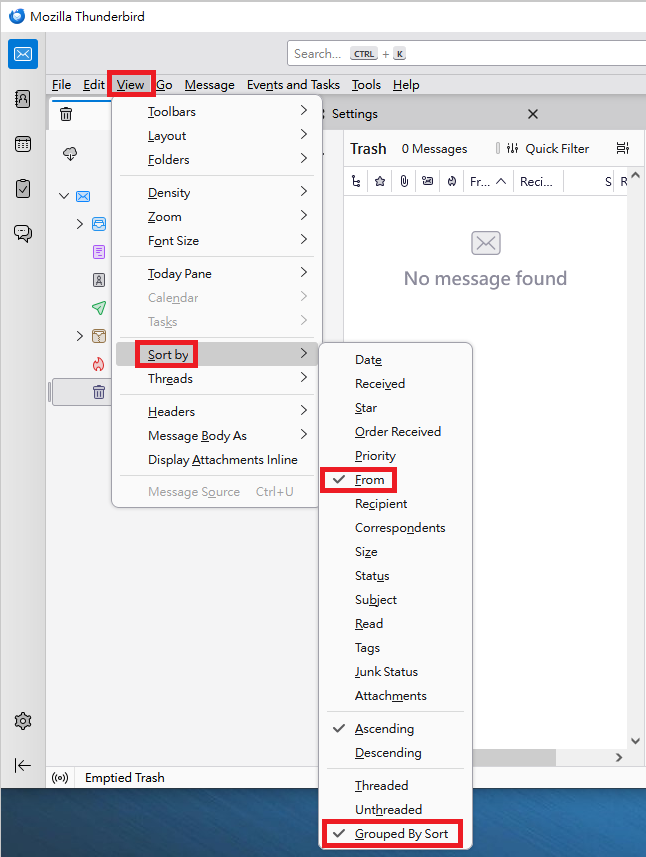
Method 1: 1. "View" > "Sort by" > tick "From". 2. "View" > "Sort by" > tick "Grouped By Sort".
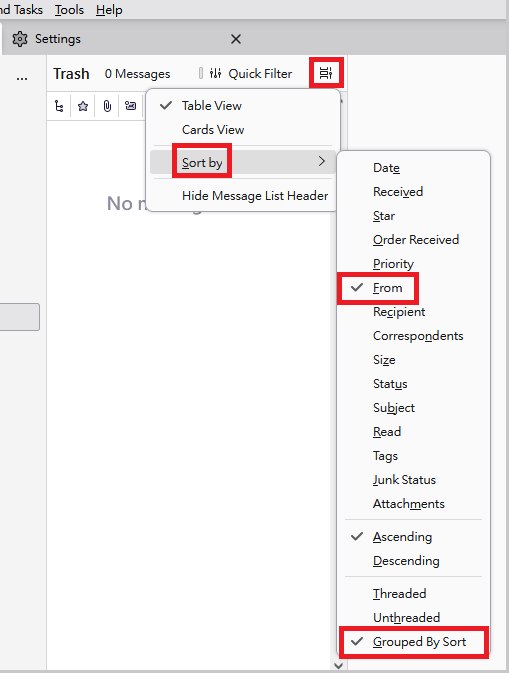
Method 2: 1. click "Message list display options" > "Sort by" > tick "From". 2. click "Message list display options" > "Sort by" > tick "Grouped By Sort".
(Please see attached images.)