


Only Filter through Bookmarks when typing in Address Bar?
I would like to reproduce the behavior that the Holmes extension on Chrome allows.
I would like to 1. Type "*" 2. Press space 3. Type the name of one my bookmarks 4. The bookmark should be the first option when I press Enter, not "Search with DuckDuckGo"
Is there a flag that can enable this?
https://chrome.google.com/webstore/detail/holmes/gokficnebmomagijbakglkcmhdbchbhn
I would like to reproduce the behavior that the Holmes extension on Chrome allows.
I would like to
1. Type "*"
2. Press space
3. Type the name of one my bookmarks
4. The bookmark should be the first option when I press Enter,
not "Search with DuckDuckGo"
Is there a flag that can enable this?
https://chrome.google.com/webstore/detail/holmes/gokficnebmomagijbakglkcmhdbchbhn
All Replies (3)
See "Changing results on the fly" :
Thank you for your quick reply!
Is there any way to temporarily disable the "Search with _____" when you type *?
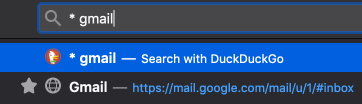
As a workaround, I just tap "Tab" which goes to the second option, (the bookmark).