

Эта тема была архивирована.
Если вам нужна помощь, задайте новый вопрос.

Архивировано
Firefox previously worked

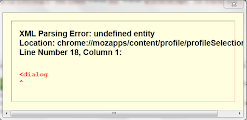
I click url : https://support.mozilla.org/en-US/kb/firefox-wont-start-find-solutions#w_firefox-previously-worked and try it.Althought I was closed firefox, but "firefox -profilemanager" not display and it show the picture
https://lh3.googleusercontent.com/-CJSgMmlOn6U/U0gqKZUB-lI/AAAAAAAAAos/uopNBfwOKCQ/h120/Capture.PNG
Please help me!!!
I click url :
https://support.mozilla.org/en-US/kb/firefox-wont-start-find-solutions#w_firefox-previously-worked
and try it.Althought I was closed firefox, but "firefox -profilemanager" not display and it show the picture
https://lh3.googleusercontent.com/-CJSgMmlOn6U/U0gqKZUB-lI/AAAAAAAAAos/uopNBfwOKCQ/h120/Capture.PNG
Please help me!!!
Все ответы (6)
- Save the installer for the latest version somewhere handy, like the desktop.
- Uninstall Firefox from the Windows Control Panel. DO NOT check the option to remove your Firefox personal data and customizations.
- Run the installer you downloaded earlier.
- If Firefox still won't start, try launching the profile manager again:
- Press the Windows logo orb on the taskbar.
- In the search box, type firefox.exe -p and press Enter.
What Firefox locale (user interface language) are you using?
Thank Gingerbread Man , I did, but it's still the same @@
Изменено mrcuong0105
I use English languge
Did you delete the Firefox program folder before reinstalling Firefox (i.e. did a clean rinstall)?
- (32 bit Windows) "C:\Program Files\Mozilla Firefox\"
- (64 bit Windows) "C:\Program Files (x86)\Mozilla Firefox\"
yes,i did