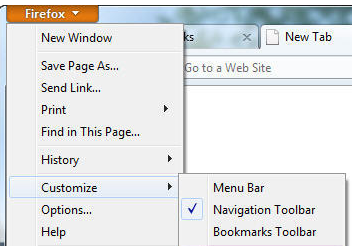
I do not see the bar to key in the website i want to use it was there previously

At the top of the page there was a bar where i can type my website address example if i want to go to my gmail account I will type in the space bar //www.gmail.com i can no longer do that . in order to do that now in the search bar below I have to key in the address and do a search.
I hope this is helpful
looking forward to your response.
Myrna forde
At the top of the page there was a bar where i can type my website address example if i want to go to my gmail account I will type in the space bar //www.gmail.com i can no longer do that . in order to do that now in the search bar below I have to key in the address and do a search.
I hope this is helpful
looking forward to your response.
Myrna forde
Все ответы (1)
Hi petra161
Right-click on an empty section of the tab strip and then check Navigation Toolbar.
see for more info and picture : Showing the Navigation Toolbar
or from Firefox button > customize > check Navigation Toolbar
thank you