


How do I access the search bar calculator ?

On the page http://www.mozilla.org/en-US/firefox/features/, in the section: Easy Search>Search Suggestions, it says there is a calculator function in the Search Bar. But the page the link (at the end of the paragraph) goes to has no information on this calculator.
It sounds like an extremely useful function, but where do I find out how to access it ?
Thanks for your help, Frank.
Выбранное решение
unfortunately there doesn't seem to be any documentation available by google directly. but maybe this page is helping: http://www.googleguide.com/calculator.html
Прочитайте этот ответ в контексте 👍 1Все ответы (6)
hello, when you type a simple mathematical operation into the searchbar (with google & suggestions enabled) then the result will show in the dropdown...
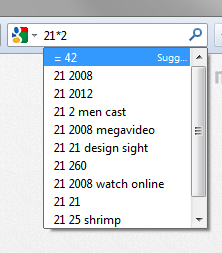
Ah yes ! After a little experimentation, I have basically got the hang of it. It even does powers (using ^) log and sin, but it would be very useful to have a full list of available functions and syntax. I haven't yet got how to do antilogs. Many thanks to you !
Изменено bannerman100
Выбранное решение
unfortunately there doesn't seem to be any documentation available by google directly. but maybe this page is helping: http://www.googleguide.com/calculator.html
Yes, that gives me what I need ! (Everything except antilogs !) Once again, many thanks !
you're very welcome :-)
Just in case its useful to anyone, to get an antilog:
The logarithm value to the base 10 is the power 10 is raised to to arrive at that value. Example: log 5 = 0.698970004 which means 10^0.698970004 = 5
So to antilog, enter 10^0.698970004 and you will get = 5
Изменено bannerman100