


I'd like to disable URL truncation in whatever you call the pop-up that replaced the status bar. If possible, I'd also like to disable the small delay before this pop-up appears.

I was reading Dinosaur Comics. Attached to each comic is a little commentary made visible by hovering the mouse over the "contact" button. Firefox appears to cut the middle out of this message when it exceeds a certain length. I'd like to know how to disable this.
Все ответы (4)
I looked through about:config and I didn't see any values which seemed relevant, though I freely admit I might have missed it.
Looks fine here.
Start Firefox in Use Troubleshoot Mode in Firefox to check if one of the add-ons is causing the problem (switch to the DEFAULT theme: Tools > Add-ons > Themes).
- Don't make any changes on the Safe mode start window.
See:
Nope, Safe Mode didn't fix it. The issue is that there's an ellipsis in the middle of the line, yet the line doesn't extend all the way across my screen. Also, is there in fact a way to disable that little delay before the URL appears?
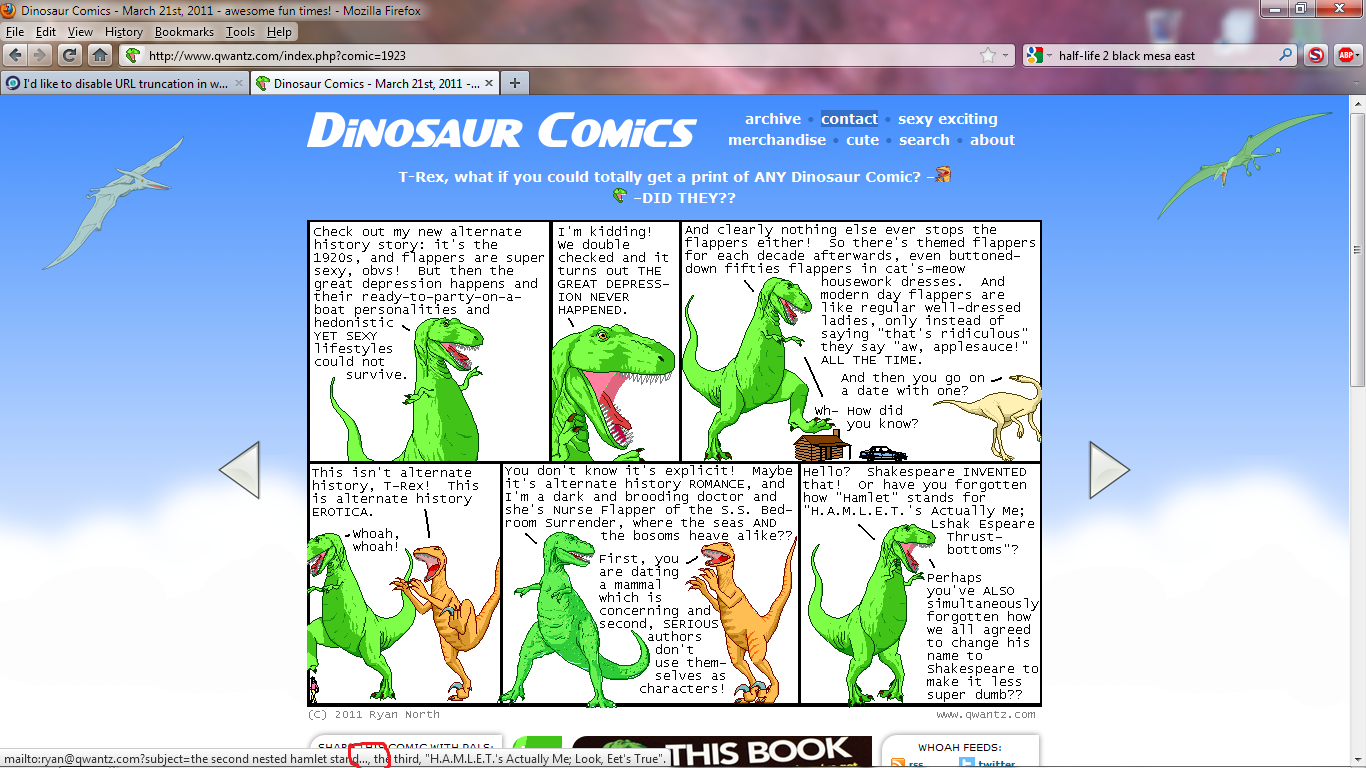
Would like to chime in here as I'm very annoyed by this. Is there a way to solve this or change its behavior?