


Top level of Account Levels "doesn't take" (bug2069949)
The issue is that the text I type into the top level of account settings, which has Account Name, and Default Identity, doesn't save. Initially I entered the email address and Thunderbird found the correct details, but I was creating seven new accounts and was going to come back later and fill in the details. However, the details on this page don't stick, wand it reverts to blank entries (as shown in the attached image), and each account's name defaults to the email address. It's awkward because if I create a new message it won't add a signature because that gets cleared with the other details on this page.
This might be related to an earlier question I asked Delete Account button doesn't work. since it's on the same page as the DELETE button. This suggests to me that there's a script engine that I'm missing on my PC. This is only a guess. I use Fire Fox as my main browser, and Vivaldi as a backup. As I say, this is only a guess.
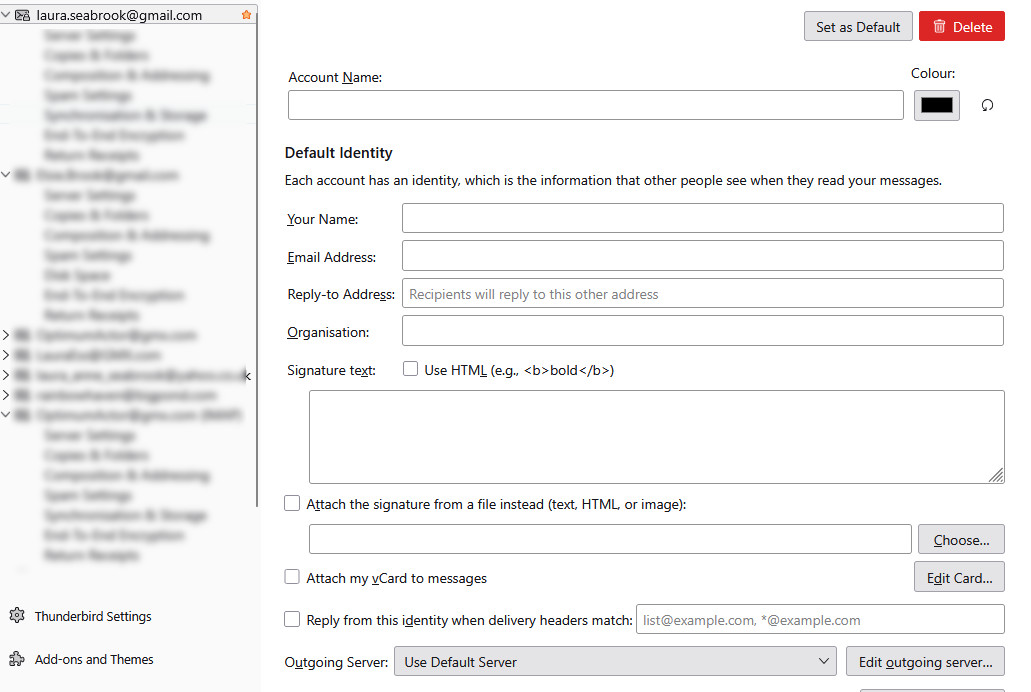
Изменено Wayne Mery
Все ответы (5)
Yes, likely the same issue https://bugzilla.mozilla.org/show_bug.cgi?id=2069949
Hmm, so there's no solution to that, yet? After reading that page I tried modifying/deleting while in OFFLINE mode but it failed as well. I'll just have to ignore these and use QuickText add-on (or equivalent) as a work around I guess, at least until there's a solution.
Nothing to do until development speaks up.
This probably won't be the most popular solution, but I've fixed this by migrating to BetterBird. I'm not saying that BetterBird is better, but it doesn't have this issue. It's taken a while to set things up, but I can alter any/all of the settings and delete accounts that went wrong.
For now I'll be using BetterBird, but I will keep watch on this, and might come back to Thunderbird once its fixed.
Изменено Laura Ess
https://bugzilla.mozilla.org/show_bug.cgi?id=2069949 should be in next week's version 157.