


Yahoo IMAP Mailbox Reserved Loop: Bulk folder stuck inside Trash

Hello Thunderbird Support, I am experiencing a severe IMAP folder synchronization loop with my Yahoo Mail account ([redacted]@yahoo.fr) inside Thunderbird. Yahoo Support claims the issue is caused by Thunderbird's folder mapping, so I am reaching out to you for a solution.
- The Problem:
The system-protected folder "Bulk" (Spam) has somehow been moved or mapped as a subfolder inside the "Trash" folder.
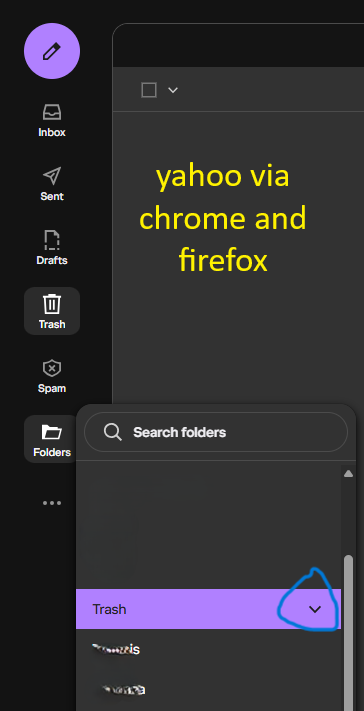
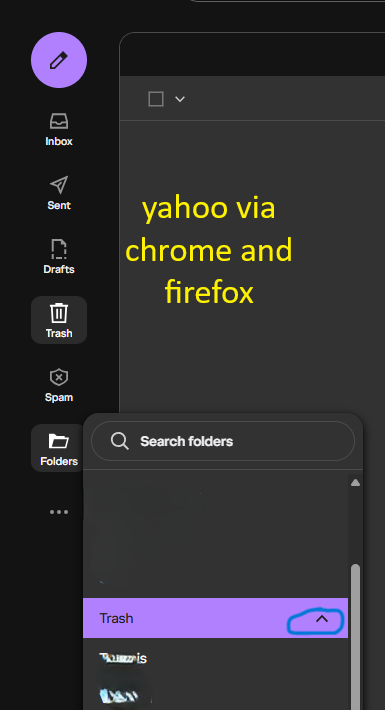
- In the Yahoo Mail Web UI (Chrome), the subfolder is invisible, but the Trash directory shows an arrow (^) indicating a child folder exists.
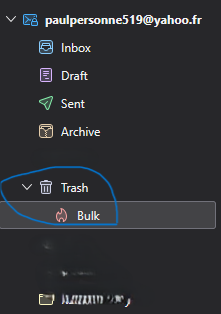
- In Thunderbird, the Bulk folder is clearly visible inside the Trash folder, marked with the flame (Junk) icon.
- What goes wrong:
When I delete spam messages via Thunderbird, they get trapped inside this nested Trash/Bulk directory. If I try to delete or empty it, the emails disappear but the folder itself cannot be removed.
- Steps tried so far that failed:
1. Attempting to delete or rename the Bulk folder inside Trash gives the server error: [CANNOT] DELETE failed - Mailbox is reserved. 2. Using Shift + Delete on the folder is rejected by the Yahoo server. 3. Unsubscribing from the folder via "Advanced IMAP settings" -> "Show only subscribed folders" fails; Thunderbird re-downloads the structure on the next sync. 4. I have completely deleted my old Thunderbird profile folder and created a brand new one using thunderbird.exe -P. Upon adding the Yahoo account via OAuth2, Thunderbird immediately pulled the same broken Trash/Bulk structure from the server again.
Since Yahoo refuses to help and claims Thunderbird caused this mapping loop, is there a hidden config setting (about:config) or a database override in Thunderbird that can force the server to release or move this reserved folder back to the root directory? Thank you for your assistance.

Изменено christ1
Все ответы (6)

I only use my yahoo imap account for tb testing. But I'm see something similar or maybe the same. I see Spam folder inside Trash as subfolder which can't be deleted. Also, the other day I notice Drafts inside Trash as a nested folder which also couldn't be deleted. I'll take a look and see what's going on.

I don't think you can delete 'Bulk', it's generated by the Yahoo server. It's the Yahoo term for the Spam folder. How got it into Trash in the first place? If you moved it there, why?
Have you tried to drag it out of Trash and drop it back into your account?
Изменено christ1
Can I assume you have no idea why spam folder got moved into trash? Did you attempt to delete spam folder at some time?
When you did this: "Attempting to delete or rename the Bulk folder inside Trash gives the server error: [CANNOT] DELETE failed - Mailbox is reserved." where you doing this in tb or in yahoo webmail? If you did this in tb, I don't think you would even see a "delete folder" option since Spam/Bulk is a "special" folder that tb won't let you deleted. However, if by some chance you are using an extension to allow folder flags to be set or cleared, it would be possible if you first cleared the spam flag from the Spam/Bulk folder.
Anyhow, in my case I see Spam folder under Trash too. I have no ideal how it got there either. But I do have a utility to clear folder flags so in the past I may have done that. However I don't know how it could have gotten set back after I moved it to Trash.
But it looks like Yahoo is telling TB that Spam under Trash IS the designated spam folder since yahoo is listing the folder like this:
- LIST (\Junk \HasNoChildren \Subscribed) "/" "Trash/Bulk"
so yahoo is telling tb that Trash/Bulk is the "Junk" folder based on the leading \Junk flag in the listing. Also, which is interesting, yahoo lists a top-level "Junk" folder like this which is NOT a special folder:
- LIST (\HasNoChildren \Subscribed) "/" "Junk"
As I mentioned, yahoo is also reporting the "Drafts" folder being under Trash like this:
- LIST (\Drafts \HasNoChildren \Subscribed) "/" "Trash/sfuib/Draft"
This describes a way to fix it using the folder flags add-on: https://www.reddit.com/r/Thunderbird/comments/xdfqub/junk_bulk_folder_in_trash_yahoo_mail/
However, as has been already asked, how did the spam folder end up in trash in the first place? From what I can tell, it is not possible to move or delete the Spam folder (or any of the other "special" folders, like Inbox, Sent, Trash, Archives, Drafts and Templates). Also, dragging them to another location is a no-op.
The only way this might be possible is if the "folder flags" addon was installed and the user cleared the \Junk folder flag and then moved Junk folder to Trash.
There's also a bug report regarding this issue with Yahoo: https://bugzilla.mozilla.org/show_bug.cgi?id=2012280. The reporter there also somehow "moved" the Junk folder into Trash.
christ1 said
I don't think you can delete 'Bulk', it's generated by the Yahoo server. It's the Yahoo term for the Spam folder. How got it into Trash in the first place? If you moved it there, why? Have you tried to drag it out of Trash and drop it back into your account?
It is not possible to move or delete the Spam folder, I did not move it, just one day I stopped receiving as much emails as usual and then found out that some of them were going to the Bulk - Spam folder which was under Trash and I had no notifications of the received spam emails.
gd_smth said
This describes a way to fix it using the folder flags add-on: https://www.reddit.com/r/Thunderbird/comments/xdfqub/junk_bulk_folder_in_trash_yahoo_mail/ However, as has been already asked, how did the spam folder end up in trash in the first place? From what I can tell, it is not possible to move or delete the Spam folder (or any of the other "special" folders, like Inbox, Sent, Trash, Archives, Drafts and Templates). Also, dragging them to another location is a no-op. The only way this might be possible is if the "folder flags" addon was installed and the user cleared the \Junk folder flag and then moved Junk folder to Trash. There's also a bug report regarding this issue with Yahoo: https://bugzilla.mozilla.org/show_bug.cgi?id=2012280. The reporter there also somehow "moved" the Junk folder into Trash.
Thank you very much for all of your replies, I will try again the reddit guide. Usually yes, it gives that error "[CANNOT] DELETE failed - Mailbox is reserved." but sometimes, when I was trying to create another folder to redirect there the Spam emails from the original Bulk folder, it did not show any error at all, but after half an hour it showed up again under the Trash. Also, there is neither the option of "delete folder" for these special folders nor move them, only for folder you create. I do not use any extension, only the app of thunderbird. After that one https://bugzilla.mozilla.org/show_bug.cgi?id=2012280 , I suppose there was a bug on that older version of thunderbird and just allowed to move ? delete ? I do not know these folders.