


Unified Inboxes and New Mail Notifications

This is more of a suggestion than a question.
I have been enjoying Thunderbird's Email account immensely, however there is one area of the interface that drives me a bit batty.
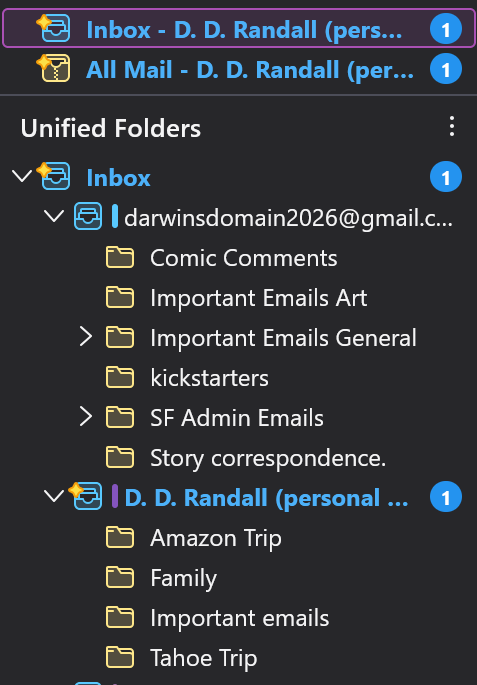
I really like using the Unified inbox, so that I can see all of the new emails from all of the accounts connected to the interface. However, I would love to see some kind of change to the interface that would reduce the duplicate notifications I get when new messages get downloaded.
When a new message comes in I get multiple notifications for it, one in the unified inbox and one in the local folders (two notifs for the same message). Additionally if I delete a new email without opening it I get notifications for trash and even spam (I really have no desire to see those ever again, they were deleted or put in spam for reasons). As you can imagine if this happens with the three or four accounts attached (especially after a few days without opening it), it can get overwhelming trying to sort how many new emails I REALLY have.
If there was a way to modify the code involved to only report the unified (or individual) inbox rather than it and the local folders and trash and spam, it would be even better than it already is.
Thank you for your time! I hope this is a suggestion that can be integrated in upcoming updates.
Sincerely, DDRandall

Выбранное решение
Denise, you can reduce the new message indications (I'm used to calling them "badges") by unsubscribing to gmail's All Mail folder. It is a common suggestion on this forum because All Mail doubles storage requirements and causes some inefficiency. Right click on the account name in the folder pane, select "Subscribe", and uncheck "All Mail" in the list.
Another improvement might be to use different folder layouts and/or a different folder structure. The main purpose of unified folders is to show all inboxes in a single, collapsed folder. If you did that, one more badge in your first screen shot would no longer appear. But you seem to use sub-folders of the inbox, so you must expand the unified inbox to see the subfolders. As far as I know, that defeats the purpose of the unified inbox. I keep sub-folders out of the inbox. (I do not know if other considerations are important in gmail.)
Are you using "Favorite folders" in addition to unified folders? And you have marked an inbox as a favorite? The more times you show a folder, the more times Thunderbird is going to tell you about new messages in that folder.
You may want to play with the options in View (menu) > Folders and see if a different layout works better for you, unless you are already familiar with the options.
If you move an unread message to the trash, Thunderbird still considers it an unread message? That does not happen in my system. I wonder if changing when Thunderbird considers messages read might help. Thunderbird settings > general > reading & display > "automatically mark messages as read".
When I move an unread message to the spam folder, Thunderbird does still consider it unread. But I must manually mark the message as unread before moving it to make that happen. if I select the message normally before moving it, Thunderbird considers it read because I have "automatically mark messages as read" set to "immediately on display".
I'm not certain about all the causes and factors in this issue. If you try some changes and then post more screen images, I or someone else may be able to help more.
Все ответы (5)
Here is another example of what I'm talking about.

I don't see what we call "notifications" in your screen shot. Notifications are what pop up from the system tray or from alerts through the operating system. Is that you are referring to?
Your screen shot is only showing folders, with what we call decorations that indicate new messages. These decorations will appear for every folder that has new messages, and also their parent folder, until you have entered the folder. There is no way to turn them off.
Выбранное решение
Denise, you can reduce the new message indications (I'm used to calling them "badges") by unsubscribing to gmail's All Mail folder. It is a common suggestion on this forum because All Mail doubles storage requirements and causes some inefficiency. Right click on the account name in the folder pane, select "Subscribe", and uncheck "All Mail" in the list.
Another improvement might be to use different folder layouts and/or a different folder structure. The main purpose of unified folders is to show all inboxes in a single, collapsed folder. If you did that, one more badge in your first screen shot would no longer appear. But you seem to use sub-folders of the inbox, so you must expand the unified inbox to see the subfolders. As far as I know, that defeats the purpose of the unified inbox. I keep sub-folders out of the inbox. (I do not know if other considerations are important in gmail.)
Are you using "Favorite folders" in addition to unified folders? And you have marked an inbox as a favorite? The more times you show a folder, the more times Thunderbird is going to tell you about new messages in that folder.
You may want to play with the options in View (menu) > Folders and see if a different layout works better for you, unless you are already familiar with the options.
If you move an unread message to the trash, Thunderbird still considers it an unread message? That does not happen in my system. I wonder if changing when Thunderbird considers messages read might help. Thunderbird settings > general > reading & display > "automatically mark messages as read".
When I move an unread message to the spam folder, Thunderbird does still consider it unread. But I must manually mark the message as unread before moving it to make that happen. if I select the message normally before moving it, Thunderbird considers it read because I have "automatically mark messages as read" set to "immediately on display".
I'm not certain about all the causes and factors in this issue. If you try some changes and then post more screen images, I or someone else may be able to help more.
Rick, Thank you for this response. I think this will help immensely keeping those other folders from ending up in the unified folder.
I clicked off the all folders, the spam, and the important. So hopefully it will only have the actual inbox and sub-folders.
I do not plan on doing away with sub folders, because if I did it would be impossible for me to find what I'm looking for. I do have filters in place that move things to specific folders upon receipt, so there should be no double ups as far as them showing up in the inbox AND the specific sub folder.
I appreciate you taking the time to propose such thorough solutions to my issue.
Sincerely, DDRandall
I am glad that I could help.
I did not mean that you should get rid of the sub-folders, only that you might want to consider moving them out of the inbox.
You unsubscribed from the spam folder? I wonder if you need access to it. All your spam folders can be unified as your inboxes are.