Captcha's repeat

Everytime I restart and open firefox and then try to access facebook, sometimes google, n=some news websites and probably other apps, I get a captcha, but it repeats no matter how many times I get it right.
I was advised to do this, but it's still happening: https://www.youtube.com/watch?v=6fX0_wiVKhw
But even that's stopped working.
I cannot access facebook and I need it for work (small org, no IT section to ask), and can't access some new sites.
I've gone to basic security settings, but that doesn't help.
What to do?
Все ответы (6)
I've since found this archived discussion: https://support.mozilla.org/en-US/questions/1446332
However, that discussion says it's google breaking the internet and doesn't affect macs.
Nonetheless, I'm on a mac and not using google (and can access the sites using capture on chrome), so I'm assuming it's google code being so distributed it's still breaking the internet?
Perhaps I need different text for the about:config?
I just wanted to add if I had a captcha prompt from accessing any application in my Windows operating system or simply opening my browser I would immediately run Hitman Pro alert and scan my system. Captcha's can come up on websites to verify man from machine but not natively from an application as you stated. I don't use Facebook for several reasons but Google does not captcha just from exciting the browser.
There are a lot of parental controller programs lots of different ways to limit people's usage but if you don't have anything weird like that installed run a scan. I only run windows and ADM.
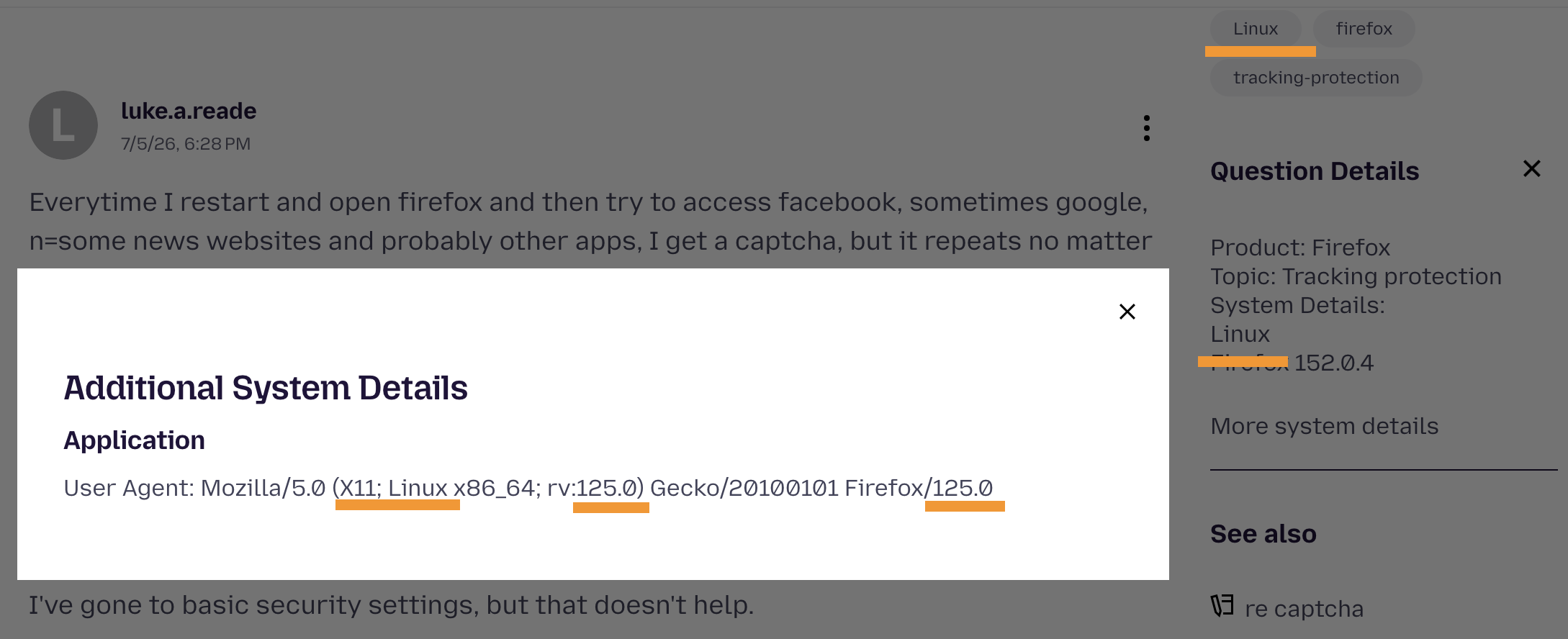
"Nonetheless, I'm on a mac" and also question details state Firefox 152 — however your user agent identification tells you're running version 125 from years ago using a Linux. Messing with these headers can easily send bot protection systems into challenging you out of existence if what you're claiming to be doesn't match the connection signature etc.
I'm definitely on a mac and the lastest version of Firefox (152.0.4), not windows or linux.
jbr - where do you get that I'm using linux and firefox 125 from (pick the non-IT guy!)? Mine is: Mozilla/5.0 (Macintosh; Intel Mac OS X 10.15; rv:152.0) Gecko/20100101 Firefox/152.0
I'm also now getting sties saying my browser is out of date. Everything works on other browsers, but I'd hate to stop using firefox if I can't sort this out (shouldn't need an IT degree to access sites!)
Изменено luke.a.reade
time to fdisk
It's captured in the "Question Details" in sidebar when you submit the post.
If you go to www.whatsmybrowser.org you can see your own identification (feel free to post the shortcode they give you in the blue header here, it doesn't contain any sensitive info) to see if the headers are still the same as when you submitted this question.
It can come from a) addons masquerading what your device really is, b) security software like antivirus/malware/phishing protections and VPNs scrambling the fingerprints, c) following random advice online and flipping things in about:config and not removing them later.
Guessing at c) you just need to remove any general.useragent.override entries added. See How to reset the default user agent on Firefox for instructions.
(The identification headers that were saved with this question: …)