


Folder Pane only opens/closes using the menu and cannot be "sized"
Until recently the folder pane could be sized or hidden via the double-headed arrowed cursor. Shortly after the 151.0.1 update this stopped working. All suggested solutions have not worked. A full uninstall (Revo Uninstall) and completely new profile has not fixed the problem. Folder pane only responds to the menu setting and is only Open/close but no sizing.
Все ответы (16)

You don't mention what those "suggested solutions" were, so all I can suggest is that you restart in Troubleshooting Mode (see Help | Troubleshooting Mode) which will temporarily disable all add-ons and interface hacks (userChrome.css) to see if they are misbehaving. Does that change things?
That pane is fully resizable for me on several computers using that version of Thunderbird on various versions of Windows and Linux.
Thanks for replying. Seriously, I have spent hours researching this problem. My setup is a bit complicated as I have relocated the profile to another drive and of course changed the files that point to the profile location. I usually have 3 or 4 or more email accounts open each to their own tab. I've used this setup for a few years and have never encountered this problem of being unable to "grab" the folder pane margins to resize the width. I restored a Macrium Reflect file/folder backup that was from several days before the problem was noticed. I have tried the obvious things like clicking menu\view\layout\folder pane and toggling it back and forth. I have done the same with the hamburger menu. I updated to 152.0. I have deleted xulstore.json and session.json. Endless starting, closing and restarting Thunderbird. I have made the app window maximized, full-sized, almost full-sized and experimented with trying to grab the left margin (which used to turn blue and allow me to open folder pane with the mouse), and with the margin between the folder pane vertical scroll bar and the messages pane. I have tried various combinations of density, folder pane headers, views, unified folders (or not).
As mentioned, I have completely uninstalled Thunderbird and removed everything from appdata and local folders and the registry. An install of 152.0 was done using all default settings and locations. I have no extensions or themes or add-ons.
I repeated some of the previous steps. The folder pane now behaves as I want it to only for the first email account tab which perhaps not coincidentally was the first account created upon installation. Previously (for years) each tab could be sized or closed/opened independently of all others. I think the fix for the first account was made when I deleted xulstore.json and restarted Thunderbird twice. At any rate that tab works as desired.
I started Thunderbird in troubleshooting mode and disabled everthing it offered. The first account tab no longer behaved as before, i.e. The folder pane was not sizeable. The other accounts folder pane did not size either.
Taking a cue from your remark about userChrome.css (which did not previously exist) I created it and tried various CSS customizations. I'm not experienced in CSS so there was a lengthy conversation with Google AI which is pasted below inelegantly. But the TLDR is that none of the below worked.
/* Add horizontal spacing to the entire folder container across all accounts */
- folderTree li > .container {
 padding-left: 15px !important;  /* Space on the left side of the folder text/icon */
 padding-right: 15px !important; /* Space on the right side */
}
3. Adjust the Width of the Entire Folder PaneIf the pane itself feels locked or you want to permanently force a specific width regardless of window adjustments, use this variable:/* Force the folder sidebar pane to a specific width layout */
- paneLayout {
--folderPaneSplitter-width: 250px !important; /* Change to your preferred width pixel size */
} Again, this did not affect the folder pane adjustability for the 2nd and 3rd accounts. The first account works fine. What needs to be changed to allow the folder pane to be sized in width using the mouse. If you are using modern versions of Thunderbird (versions 115 through 128+), you are running into a layout quirk where the structural bounding boxes for your 2nd and 3rd accounts are literally "clipping" out of the visible pane boundary. This causes the mouse cursor to miss the hidden layout engine splitter entirely when hovering lower down on the screen To restore your ability to resize the pane with your mouse across all email accounts, you must explicitly force the structural overflow properties to stay synchronised. The CSS Fix to Restore Mouse-DraggingAdd this specific code to your userChrome.css file. It overrides the hidden block dimensions so that the window splitter responds to your mouse anywhere along the vertical border: /* Ensure the layout block allows resizing across all accounts */
- paneLayout,
- folderTree,
- folderPane {
 min-width: 100px !important;  /* Stops the structural layout from locking up */
 max-width: 800px !important;  /* Allows the mouse boundary to expand */
 overflow: visible !important; /* Prevents 2nd/3rd accounts from blocking the splitter */
}
/* Forces the modern drag-splitter to overlay perfectly on the border */
- folderPaneSplitter {
 width: 6px !important;        /* Makes the invisible mouse target area slightly wider */
 cursor: col-resize !important; /* Guarantees the double-headed arrow shows up */
 z-index: 100 !important;      /* Forces the dragging bar to sit on top of all accounts */
} What to do if the mouse still won't grab it:If the interface is severely glitched, your local interface layout file may be corrupted, locking the sidebar layout permanently for multi-account views. You can safely clear this layout cache:Go to Menu (≡) > Help > Troubleshooting Information.Click Open Folder next to your Profile Folder.Close Thunderbird completely while keeping that folder window open.Locate the file named xulstore.json and delete it (or rename it to xulstore.json.bak to be safe).Relaunch Thunderbird. It will reset the window layouts to the factory default, forcing the mouse divider to work correctly across the entire height of the screen.If the splitter works but the folder names inside look cut off or squeezed, let me know if they need a text alignment tweak!
These "suggestions" gave very poor results. scroll bars disappeared, the extreme left wall of the window indented, toggles wouldn't work. I'm out of ideas and hope you or others may have some ideas.
The userchrome thing is not intended to fix thing and is not guaranteed to work. If you don't know what you're doing, it is not recommended.
You mention that you have multiple accounts open each in a separate tab. This is a very unusual setup configuration, and I don't find any option to enable it, and I don't believe it's officially supported. I've been using Thunderbird for decades and I didn't even know that you could do that. I suspect that's the source of your problem. I don't know how to fix it. Sorry.
My only suggestion is to turn off that multiple accounts thing and go back to using the interface the way it was intended.
Lin said
You mention that you have multiple accounts open each in a separate tab. This is a very unusual setup configuration, and I don't find any option to enable it, and I don't believe it's officially supported. I
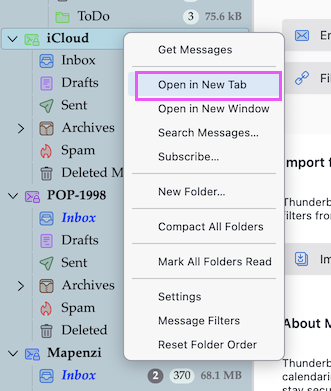
Hi Lin, it IS officially supported and you can do it via the R-click menu > "Open in New Tab" or also "Open in New Window" (see picture) But I wouldn't see any advantage in doing this. The accounts opened in new tabs are still present in the folder pane.
Mapenzi said
Lin said
You mention that you have multiple accounts open each in a separate tab. This is a very unusual setup configuration, and I don't find any option to enable it, and I don't believe it's officially supported. IHi Lin, it IS officially supported and you can do it via the R-click menu > "Open in New Tab" or also "Open in New Window" (see picture) But I wouldn't see any advantage in doing this. The accounts opened in new tabs are still present in the folder pane.
Huh! You're right! I never noticed that option before. I did actually do a little searching to see if such a feature existed before I brought it up but I didn't find any mention of it, which suggests to me that few people use it. And, looking at it now, it would be of no advantage to me. I also find that it doesn't affect the pane-resizing issue that sparked this thread - that works as it should and always has for me.
I think if I had this problem I'd create a new profile, even if just for testing, and if it works and no other solution presented itself, I'd migrate everything over to the new profile, bit by bit.
Lin said
I did actually do a little searching to see if such a feature existed before I brought it up but I didn't find any mention of it, which suggests to me that few people use it. And, looking at it now, it would be of no advantage to me.
In all those years I've been wandering through Thunderbird forums I've never seen someone use this feature.
<p>Lin saidI think if I had this problem I'd create a new profile, even if just for testing,
i agree with you that a test in a new profile would be my next diagnostic step.
I use the multiple tabs for multiple accounts as my way of doing my "in-basket" routine. I find it easy to get back to something I was reading before I moved to something else. It is my version of multi-tasking and taking care of things later when I want. If in the meantime I receive new emails from multiple accounts they are readily available. I can see that some people would want to finish up working on one account before opening a different one and the folder pane sure makes that possible. With my way I don't need the folder pane open (or open just enough to show a small part of my folder structure) and so have more overall width available for my message list and message contents.
I appreciate that Lin mentioned having multiple tabs/accounts open had no impact on the ability to resize the folder pane. As I said, I've used this setup for years. It even survived a fresh install of Windows 11 when I switched from 10. After a bare SSD install of 11 I just copied my Profile from a backup, made a couple of install.ini and profile.ini edits and went about my business.
Using the userchrome CSS stuff was an interesting side-trip but it didn't seem to resolve the issue and I'm glad I don't have to resort to it. I've used it for minor tweaks for other software (Gnucash). Thanks for the cautionary advice.
Anyway...To the issue at hand...I have already totally removed Thunderbird from this PC and started over from scratch with 152.0 installed on D: with AppData on C:. New Profile in AppData. The installation used only Default settings except I changed when messages are marked as read and required device and primary passwords. Vanilla Vanilla. I'm willing to start from scratch again but in hopes that I might yet receive other suggested remedies in the meantime I'm going to put that off for a few days.
Thanks all and keep those cards and letters coming!
So even in a new profile with v152.0 - and without importing anything from th old profile - you are not able to adjust the width of the folder pane by moving the folder pane splitter with the mouse pointer to the right or the left (see images)? I cannot reproduce your problem and have no idea what is happening....
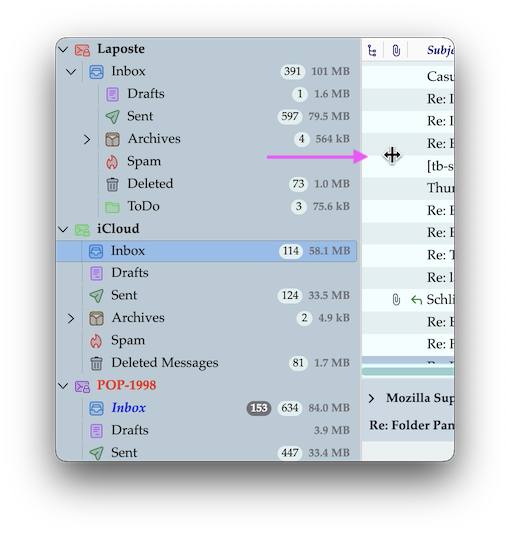
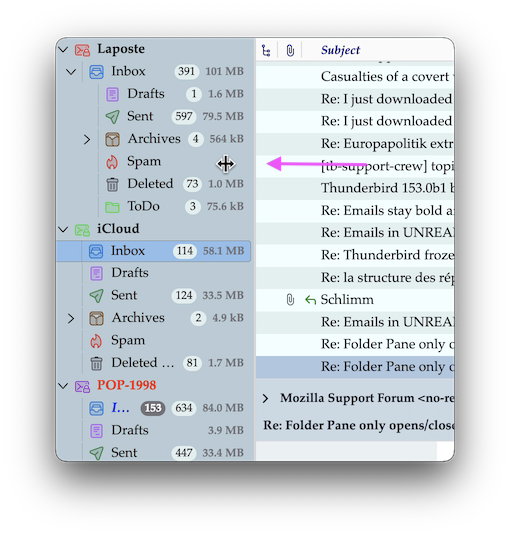
Although the cursor does not show the splitter cursor as yours, for the first tab account I do have a double arrowheaded cursor without the middle vertical line only for the first account tab. I get a horizontal line with an arrowhead at the left and right ends. The other account tabs do not manifest a splitter curor of any kind. Yeah, I'm mystified too but thanks for confirming the understanding of the issue.
I apologize, I do not know how to show you a screenshot of the cursor in these scenarios. My screenshot tools (WIN + Shift + S or FN + ScreenPrint) do not show the cursor.
Merci
I can replicate this in Daily build
Name Thunderbird Version 153.0a1 Build ID 20260610104000
I do not see it in the ESR release
Name Thunderbird Version 140.11.1esr Build ID 20260522210329
I strongly suspect the change is an unintended consequence of https://bugzilla.mozilla.org/show_bug.cgi?id=1997346
I suggest you file a bug in Bugzilla for the issue and post a link here so I can follow along.
https://bugzilla.mozilla.org/home The application will be "Thunderbird" and component "Mail window front end"
The bug 1997346 might be related. I can't quite follow the discussion.. But I did see bug 2011469 which def seems related to my issue since I have a multiple tabs/email accounts issue where the folder pane appearance (status) used to vary for each tab but now does not. I had viewed the problem as a border detection issue and not realized that there are multiple folder pane instances: one for each tab/account.
I will try to file a bug but I'm way out of my depth here. Anyhow, thanks for hopping in and suggesting this avenue.
Here is the bug link: https://bugzilla.mozilla.org/show_bug.cgi?id=2048826
Mapenzi said
I cannot reproduce your problem and have no idea what is happening....
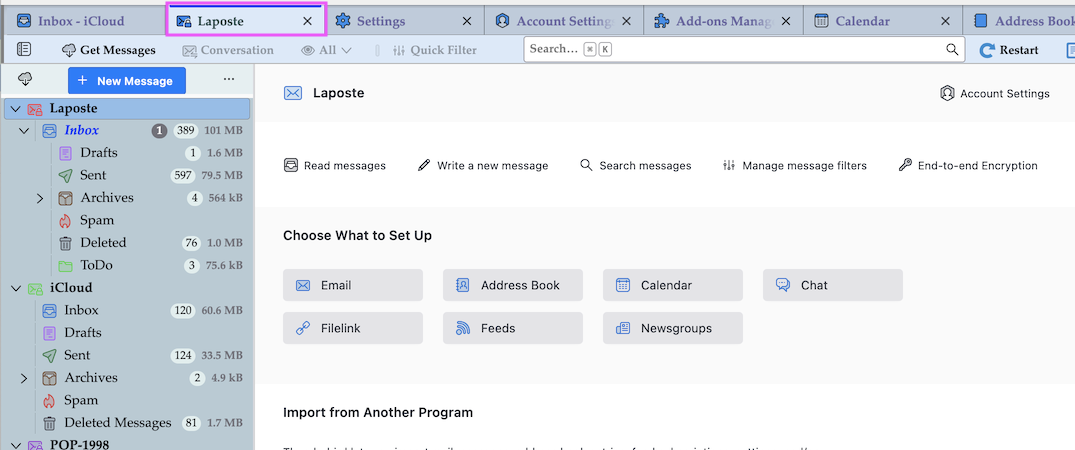
I must correct my statement, probably I had tested this issue before updating to v152. Now I can confirm that one cannot move the folder pane splitter to adjust folder pane width. But there is a side effect even worse now in my Mac version of Thunderbird 152 and in classic view, which hasn't been reported by the question owner: after opening an account in another tab the account central is displayed instead of the thread pane and the message pan, just like in the mail tab (picture)
Изменено Mapenzi

after opening an account in another tab the account central is displayed instead of the thread pane and the message pan, just like in the mail tab (picture)
Open the Inboxes, not the Accounts.
Изменено Ed
Ed is correct that typically one would mean the Inbox is chosen to open in a new tab but the faulty behavior with the folder pane is at issue. So whether the inbox or for that matter any other existing folder in any other registered account) is what was opened in a new tab it remains that the folder pane is not working correctly.
I have opened a bug report: https://bugzilla.mozilla.org/show_bug.cgi?id=2048826 but I appreciate any/all comments here or there.
Ed said
Open the Inboxes, not the Accounts.
I only reported the fact. I never open inboxes or accounts in new tabs as does the question owner.
looks like a fix has already made it to the approval stage. I was wrong about he source apparently, but I was just the obvious thing a change at the right time to be a cause.