


Windows 10 reached EOS (end of support) on October 14, 2025. If you are on Windows 10, see this article.

Avatar for Username

Поиск в поддержке

Избегайте мошенников, выдающих себя за службу поддержки. Мы никогда не попросим вас позвонить, отправить текстовое сообщение или поделиться личной информацией. Сообщайте о подозрительной активности, используя функцию «Пожаловаться».

Подробнее
Открытый

Blocking sites via (multiple) Add-ons is not working

gatzelabordus

Hello,

I had a fresh windows installation and so I had to install firefox again.For addictive reasons I use a site blocker to block certain sites: https://addons.mozilla.org/en-US/firefox/addon/block-website/?utm_source=addons.mozilla.org&utm_medium=referral&utm_content=search

But it didn't work anymore. So I thought maybe it is something in the add-on, but I thought I will try another one:

https://addons.mozilla.org/en-US/firefox/addon/leechblock-ng/?utm_source=addons.mozilla.org&utm_medium=referral&utm_content=search

But this is also not working, so maybe there is something changed within firefox or something ? Or does anybody know how to get it working ? Using the latest version 150.0.1

Thanks in advance

Hello, I had a fresh windows installation and so I had to install firefox again.For addictive reasons I use a site blocker to block certain sites: https://addons.mozilla.org/en-US/firefox/addon/block-website/?utm_source=addons.mozilla.org&utm_medium=referral&utm_content=search But it didn't work anymore. So I thought maybe it is something in the add-on, but I thought I will try another one: https://addons.mozilla.org/en-US/firefox/addon/leechblock-ng/?utm_source=addons.mozilla.org&utm_medium=referral&utm_content=search But this is also not working, so maybe there is something changed within firefox or something ? Or does anybody know how to get it working ? Using the latest version 150.0.1 Thanks in advance

Все ответы (3)

Hello

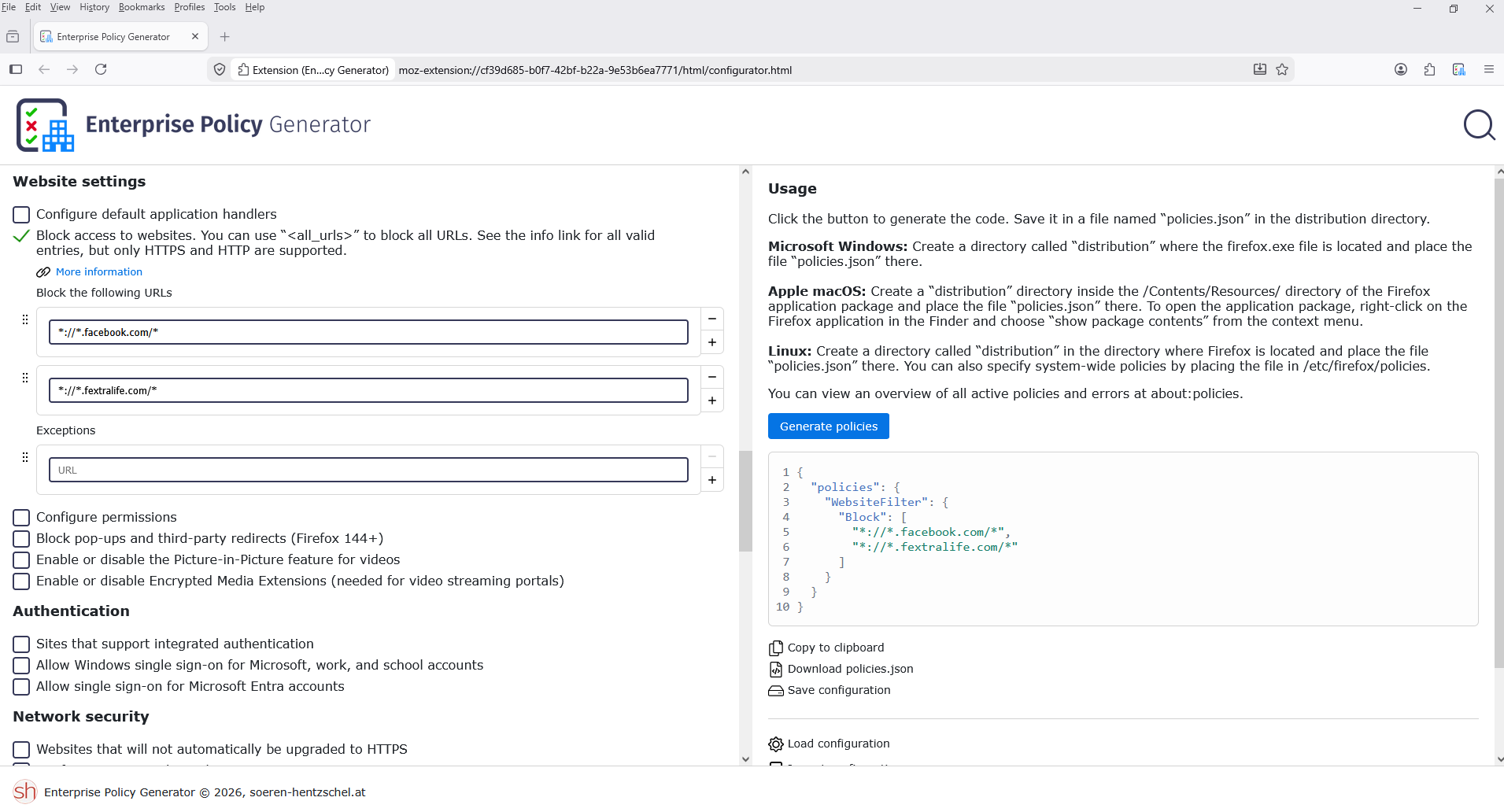
For information, you can try Customize Firefox using policies.json https://support.mozilla.org/en-US/kb/customizing-firefox-using-policiesjson WebsiteFilter https://mozilla.github.io/policy-templates/#websitefilter

For illustrations, take a look at https://support.mozilla.org/en-US/questions/1503118

For illustration. https://connect.mozilla.org/t5/ideas/block-certain-websites-from-displaying-on-search-results/idc-p/58643/highlight/true#M34202

Firefox policies affect all profiles. Your browser is being managed by your organization
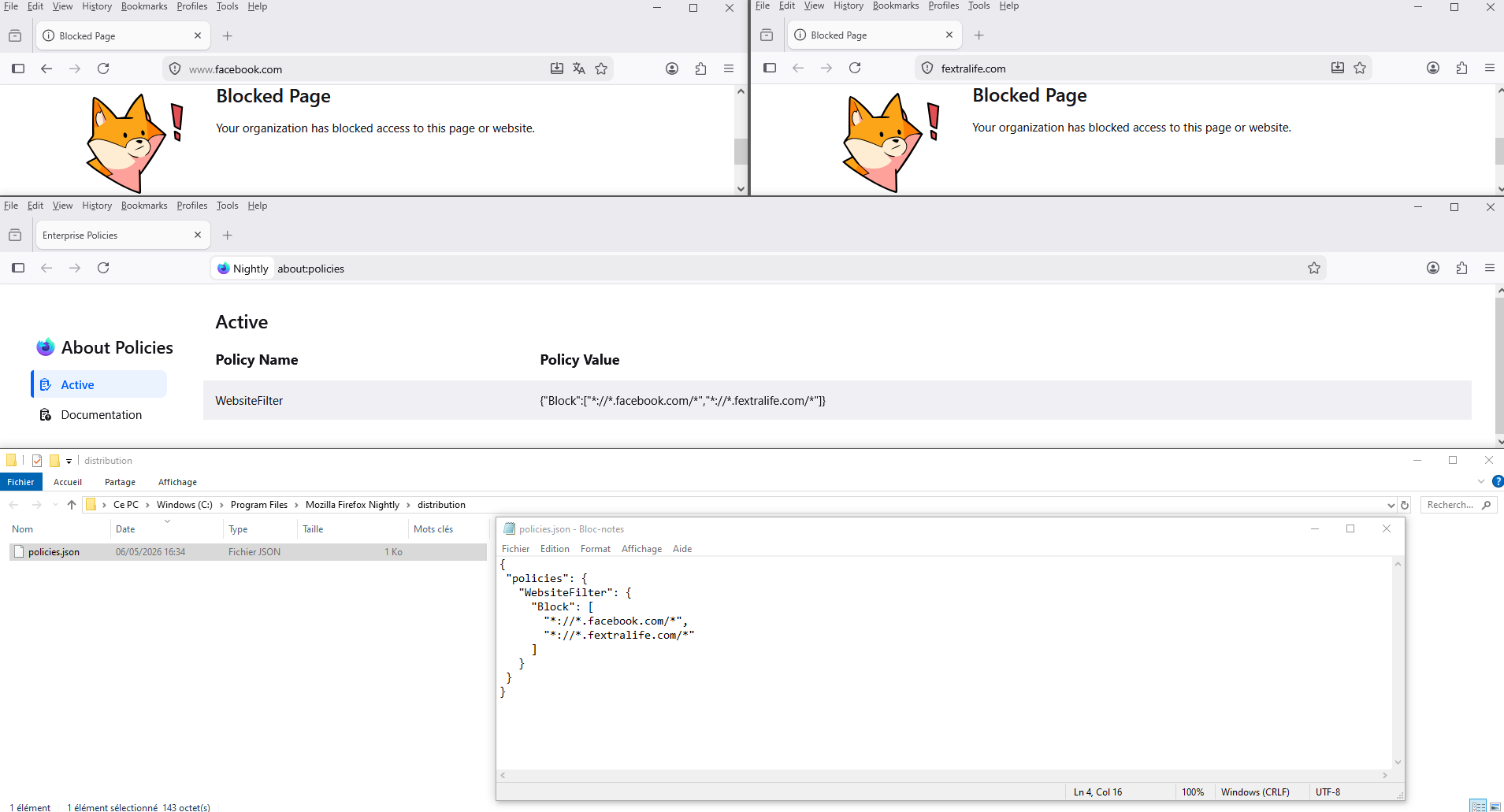
The Enterprise Policy Generator helps administrators configure Firefox using a configuration file https://addons.mozilla.org/firefox/addon/enterprise-policy-generator
Задать вопрос

Для ответа на сообщения вы должны войти в свою учётную запись. Пожалуйста, задайте новый вопрос, если у вас ещё нет учётной записи.