


Thunderbird 140.9.1 ESR: Tagged message background turns white when losing focus (userChrome.css help)

Hi everyone, I'm trying to customize the message list appearance in Thunderbird 140.9.1 ESR (64-bit) using userChrome.css.
Goal: I want to change the background color of the entire row for tagged messages (e.g., 'Important'). The color should persist even when the message is NOT selected (when I click on another email).
The Issue: Currently, any background color I apply via CSS only shows up when the message is selected. As soon as I select a different email, the background of the tagged row reverts to white, even though the text color remains correct.
What I've tested so far:
toolkit.legacyUserProfileCustomizations.stylesheets is set to true.
The userChrome.css file is being loaded (a global test like * { background-color: blue !important; } works perfectly).
I've tried multiple selectors: tr.tag-important, tr[data-properties~="tag-important"], and tr[is="thread-row"], targeting both tr and td.
It seems like in version 140 ESR, there's a hardcoded background-color on table cells (td) or a CSS variable that overrides the row background when the focus is lost. Does anyone know the specific selectors or CSS variables needed for this version to make the background color stick?"
Thanks everybody. Maurizio
Все ответы (1)
You can do this with the following CSS code
 #threadTree  tbody [data-properties~="tagged"] {
  background-color: var(--tag-color) !important;
  color: var(--tag-contrast-color) !important; }
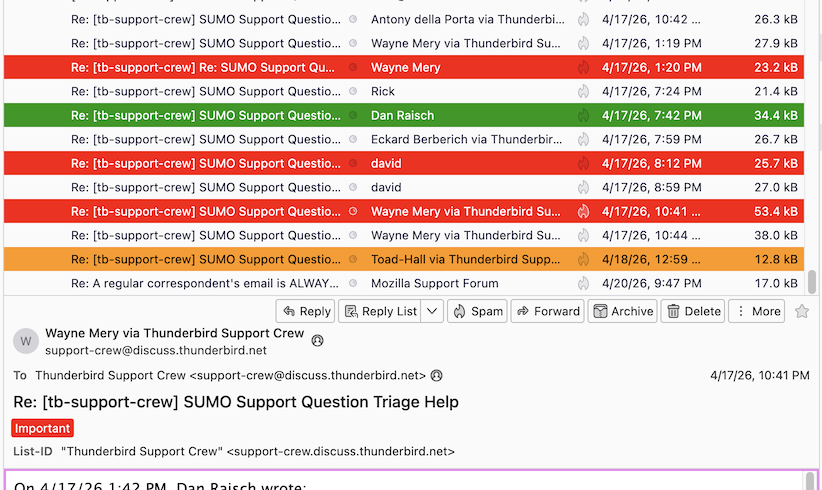
My first attached image shows that this code works for me.
But I don't use it since with this code I would no longer distinguish between selected tagged messages and unselected tagged messages, in focus and not in focus, they appear all the same having the same tag.
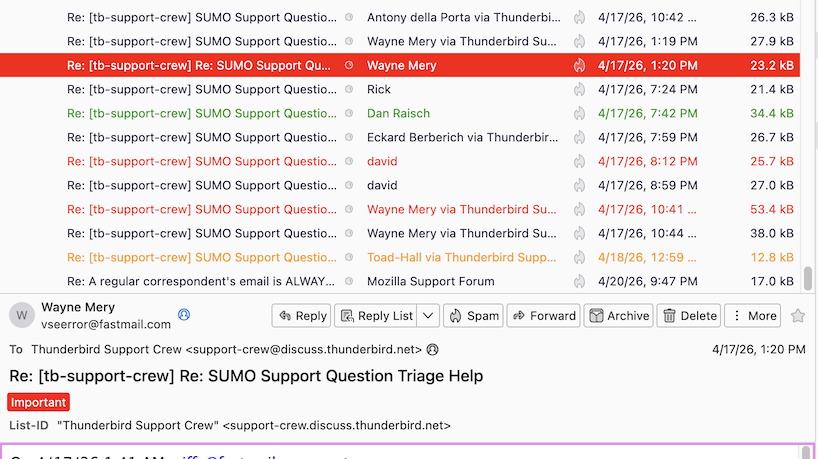
My second image shows the default thread pane without the CSS code
Изменено Mapenzi