


Identified spam messages are not moved to spam folder

Settings have been set to move Spam to my spam folder. Although Spam is identified it does not get moved to my Spam folder. It used to happen but an upgrade a while back seemed to stop it happening. I have tried undoing and re-doing settings to no avail. Can someone help please?
Выбранное решение
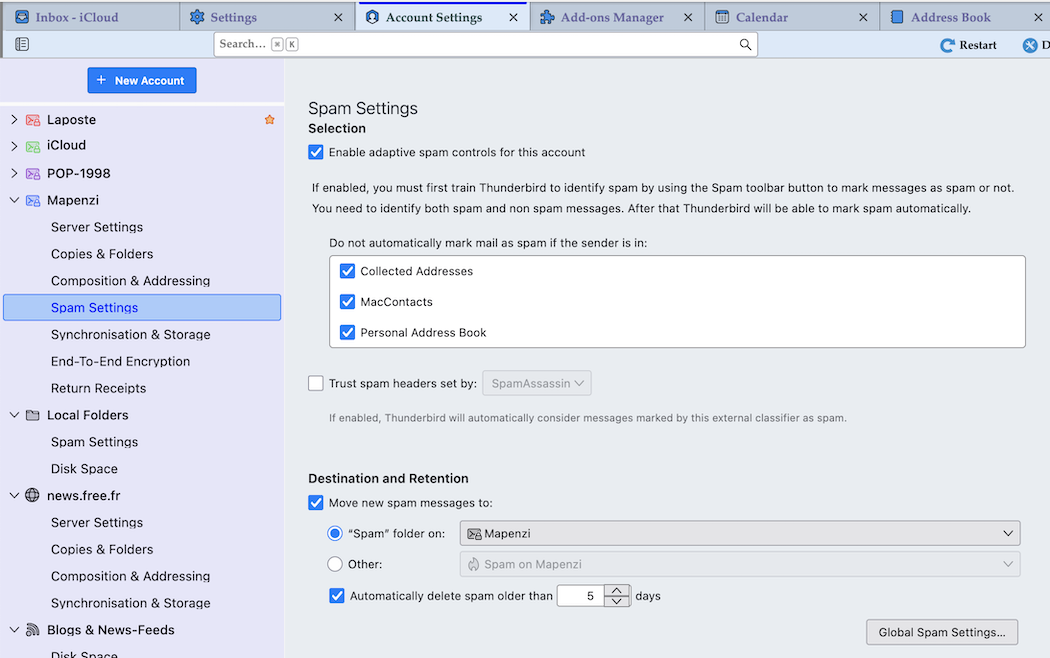
See my image (Account settings > Account > Spam Settings
Все ответы (4)
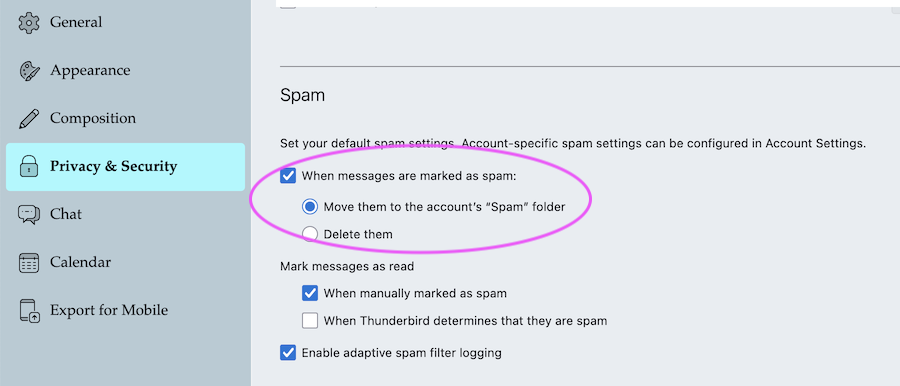
There are also "Global Spam Settings" to observe in Settings > Privacy & security > Spam....
Sorry, but already tried that, tried again and no joy. Must be something else?

I also have this problem. I have tried resetting the spam settings.
I have manually set messages as spam but messages still show up with the spam indicator, indicating that the message is spam but it does not move it to the junk folder. I have set the spam setting to move it to the junk folder. Why doesn't it automatically go to the junk folder? When I set a message as spam it is sent to the junk folder but after that the same sender shows up and is marked as spam but not automatically moved to the junk folder. If I toggle the indicator off then on, the message goes to the junk folder. After that it shows up with the indicator but does not automatically move to the junk folder.
Выбранное решение
See my image (Account settings > Account > Spam Settings