


Formatting bar not showing

Hi,
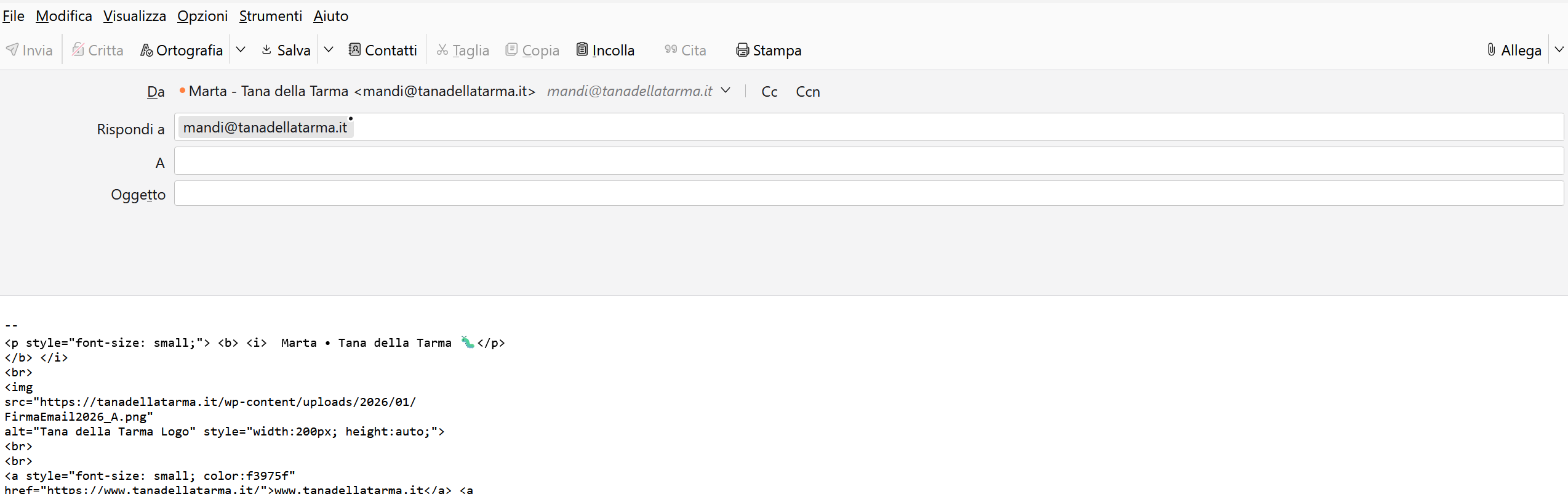
I cannot see any formatting bar in my "new message" window. I cannot change my text format, I tried to change a lot of settings but nothing seem to work.
I also cannot customize my signature - the html just shows weird and not as expected
Выбранное решение
To get the formatting bar, go to 'account settngs' , click the account in left side bar, then the 'composition&addressing' link, and tick to compose in HTML The other option is to press the shift key when clicking the 'new message' button
to permanently set the HTML signature, go to 'account settings' pane and click the account name in left sidebar. the composition window will be on the right.
If you want to edit HTML while in compose window, I encourage using the ThunderHTMLedit addon at https://www.betterbird.eu/addons/
Прочитайте этот ответ в контексте 👍 0Все ответы (1)
Выбранное решение
To get the formatting bar, go to 'account settngs' , click the account in left side bar, then the 'composition&addressing' link, and tick to compose in HTML The other option is to press the shift key when clicking the 'new message' button
to permanently set the HTML signature, go to 'account settings' pane and click the account name in left sidebar. the composition window will be on the right.
If you want to edit HTML while in compose window, I encourage using the ThunderHTMLedit addon at https://www.betterbird.eu/addons/