


Firefox won't open and immediately ends all processes

Through extensive troubleshooting, I am unable to get firefox to open at all.
I've done a full uninstall, cleaned all user directories, program files / x86, program data, appdata roaming and local, etc. I used the Microsoft uninstaller and even Revo Uninstaller to remove everything related to Firefox, did a restart and reinstall of the latest one and it still won't launch.
Firefox was previously working until a reboot occurred and now it won't launch.
Firefox 32 bit seems to work when installed, and running Firefox as an admin previously worked but no it no longer does.
I looked at the following articles: - https://support.mozilla.org/en-US/kb/firefox-wont-start-find-solutions - https://support.mozilla.org/en-US/kb/profile-manager-create-remove-switch-firefox-profiles - https://support.mozilla.org/en-US/kb/profile-manager-create-remove-switch-firefox-profiles#w_start-the-profile-manager-when-firefox-is-closed
There's no malware on this machine (business EDR on it, even disabled it as a test and it still didn't open).
I was able to launch the profile manager but now I am unable to as the processes launch in task manager and then within 5 seconds they close.
Firefox is not running in the background for any user (I'm the only one logged in after a reboot as well)
I'm unable to open in troubleshoot mode either. Tried run as and admin cmd "C:\Program Files\Mozilla Firefox\firefox.exe" -safe-mode
Ran SFC / scannow / DISM restore health commands as well and both came back fine / no integrity violations
Выбранное решение
Mozilla devs already send it to them, so you don't have to.
Прочитайте этот ответ в контексте 👍 0Все ответы (18)
We're sorry to hear that your Firefox seems to be crashing when you open it. Please perform the following steps to give us a crash report ID that helps us find out more about the cause of the crash.
- On the keyboard, press [Windows]
 + [R]. This should bring up a Run box that contains a text field.
- In that text field, type %APPDATA% and press Enter. An explorer window should open.
- From that explorer window, double-click on the Mozilla folder, then double-click on Firefox and then on Crash reports. Double-click on submitted.
- Now, you should see a list of files that contain reports. Go to View > Arrange Icons by > Modified to get the most recent files at the top of the window.
- Open the most recent 5 files with a text editor and copy the IDs.
- Paste each ID with bp- into the reply window on the forums.
Thanks in advance!
You can find more information and troubleshooting steps in the Troubleshoot Firefox crashes (closing or quitting unexpectedly) article.
Sorry for the delay, Since I installed 32-bit to just function / work during the day I had to uninstall / reinstall 64-bit when I had time.
There is a crash reports folder but no data inside of the logs or events. I even simulated Firefox to crash several times, and it still doesn't go through.
I attached a screenshot of the directory showing nothing.
I have a quick video showing the process crash / fail to launch, but I am unable to upload it to this site.
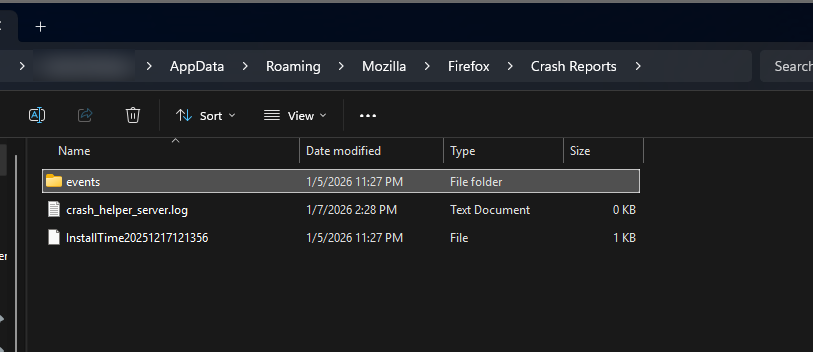
Yes, SentinelOne is on this machine.
S1 hasn't received an update in over a month and FF 64-bit has been working fine ever since I made this post & there are 29 other employees who are allowed to use FF with S1 installed and no exclusions as well.
Did something change in 146.0.1? Even though that was released on the 18th of December, trying to think of anything else in this case.
Again, 32-bit has no issues.
I don't know why it's so selective. We have these crashes since 146.0, but we don't believe it was something on our side. Nevertheless, Sentinel is blacklisted since Firefox 147.0.
Im genuinely confused because before I opened this topic up, I disabled S1 and tested and it still failed which is why I ruled it out and even stated in the opening thread that I tried that.
I just tried it again, and it worked by disabling S1...
Can you elaborate on "Sentinel is blacklisted since Firefox 147.0."?
Do you have any information, logs, developer statements for me so I can go back to SentinelOne and push on them about this?
Выбранное решение
Mozilla devs already send it to them, so you don't have to.
Is there a beta build of 147 I can run to prevent this issue?
I don't want to disable S1 everytime I want to use FF (which is daily) nor put in a browser exclusion which seems excessive.
Now that 147 is GA, I tested it and it still seems S1 is catching it in some regard.
It fails to open once (I see the 2 firefox.exe processes spawn and then immediately close within seconds) and then after closing, it opens just fine this time.
In "C:\Users\USER\AppData\Roaming\Mozilla\Firefox\Crash Reports , Mozilla doesn't have any logs for crashes almost like its not treating it as a crash.
Do you know if Mozilla is still tracking this / working with S1?
Just wanted to confirm the issue is fixed (for me) for Arm64 processors on the newest Firefox Beta. Amazing. I was suffering with this Sentinel One / Firefox incompatibility since at least September 2024!
Windows 11 Enterprise 25H2 build 26200.7462 Sentinel version 24.2.3.471 Firefox 148.0b5 (aarch64) - did not seem to work on 147.
148 works for you?
I just got an official crash on 147.0.1
I followed your path from above and "submitted" doesn't exist but there is a submit.log in path "C:\Users\USER\AppData\Roaming\Mozilla\Firefox\Crash Reports" just stating one was submitted.
Here are the details from the crash reporter
BuildID: 20260116091309 CrashTime: 1769095244 InstallTime: 1769089798 ModuleSignatureInfo: {"Microsoft Windows":["bcryptprimitives.dll","psapi.dll","wintrust.dll","clbcatq.dll","DXCore.dll","comdlg32.dll","Microsoft.Internal.FrameworkUdk.dll","MicrosoftAccountTokenProvider.dll","windows.internal.shell.broker.dll","explorerframe.dll","Microsoft.Internal.FrameworkUdk.System.dll","twinapi.dll","wpnapps.dll","ntshrui.dll","linkinfo.dll","NetworkExplorer.dll","UIAutomationCore.DLL","edputil.dll","cldapi.dll","ondemandconnroutehelper.dll","dataexchange.dll","nlansp_c.dll","winrnr.dll","NapiNSP.dll","SystemSettings.DataModel.dll","wscapi.dll","D3D10Warp.dll","Windows.System.Launcher.dll","Windows.FileExplorer.Common.dll","wininet.dll","icu.dll","StructuredQuery.dll","windows.staterepositoryclient.dll","OneCoreCommonProxyStub.dll","WTDSENSOR.dll","Windows.ApplicationModel.dll","comctl32.dll","directmanipulation.dll","TextShaping.dll","Windows.Globalization.dll","iertutil.dll","Windows.UI.Immersive.dll","Windows.UI.dll","Bcp47Langs.dll","cscapi.dll","Windows.Web.dll","Windows.Security.Integrity.dll","windows.staterepositorycore.dll","dbgcore.dll","AudioSes.dll","textinputframework.dll","oleacc.dll","wsock32.dll","srvcli.dll","mpr.dll","xmllite.dll","ktmw32.dll","npmproxy.dll","wshbth.dll","OneCoreUAPCommonProxyStub.dll","twinapi.appcore.dll","wtdccm.dll","msimg32.dll","icm32.dll","mscms.dll","dhcpcsvc.dll","dhcpcsvc6.DLL","MMDevAPI.dll","rasadhlp.dll","FWPUCLNT.DLL","winmm.dll","netprofm.dll","CoreUIComponents.dll","avrt.dll","directxdatabasehelper.dll","taskschd.dll","policymanager.dll","Microsoft.Internal.WarpPal.dll","windowscodecs.dll","DWrite.dll","d3d11.dll","dcomp.dll","CoreMessaging.dll","apphelp.dll","secur32.dll","wtsapi32.dll","uxtheme.dll","dxgi.dll","winnsi.dll","dwmapi.dll","propsys.dll","dbghelp.dll","windows.storage.dll","slc.dll","netutils.dll","IPHLPAPI.DLL","dnsapi.dll","rsaenh.dll","kernel.appcore.dll","winhttp.dll","ntmarta.dll","sspicli.dll","mswsock.dll","CRYPTBASE.dll","cryptsp.dll","msasn1.dll","winsta.dll","ntasn1.dll","ncrypt.dll","umpdc.dll","devobj.dll","cfgmgr32.dll","sxs.dll","powrprof.dll","version.dll","bcrypt.dll","profapi.dll","WinTypes.dll","KERNELBASE.dll","win32u.dll","crypt32.dll","ucrtbase.dll","msvcp_win.dll","gdi32full.dll","sechost.dll","ws2_32.dll","shlwapi.dll","combase.dll","imagehlp.dll","ole32.dll","msctf.dll","oleaut32.dll","shell32.dll","gdi32.dll","imm32.dll","kernel32.dll","setupapi.dll","rpcrt4.dll","advapi32.dll","SHCore.dll","user32.dll","nsi.dll","msvcrt.dll","ntdll.dll","urlmon.dll","urlmon.dll","urlmon.dll","urlmon.dll","urlmon.dll","urlmon.dll","urlmon.dll","urlmon.dll","urlmon.dll","urlmon.dll","urlmon.dll","urlmon.dll","urlmon.dll","urlmon.dll","urlmon.dll","urlmon.dll","urlmon.dll","urlmon.dll","urlmon.dll","urlmon.dll","urlmon.dll","urlmon.dll","urlmon.dll","urlmon.dll","urlmon.dll","urlmon.dll","urlmon.dll","urlmon.dll","urlmon.dll","urlmon.dll","urlmon.dll","urlmon.dll","urlmon.dll","urlmon.dll","urlmon.dll","urlmon.dll","urlmon.dll","urlmon.dll","urlmon.dll","urlmon.dll","urlmon.dll","urlmon.dll","urlmon.dll","urlmon.dll","urlmon.dll","urlmon.dll","urlmon.dll","urlmon.dll","urlmon.dll","urlmon.dll","urlmon.dll","urlmon.dll","urlmon.dll","urlmon.dll","urlmon.dll","urlmon.dll","urlmon.dll","urlmon.dll","urlmon.dll","urlmon.dll","urlmon.dll","urlmon.dll","urlmon.dll","urlmon.dll"],"Mozilla Corporation":["firefox.exe","xul.dll","freebl3.dll","gkcodecs.dll","nss3.dll","mozglue.dll","softokn3.dll","lgpllibs.dll"],"Siber Systems":["roboform-x64.dll"],"Microsoft Corporation":["Microsoft.UI.Input.dll","CoreMessagingXP.dll","Microsoft.InputStateManager.dll","Microsoft.UI.Windowing.Core.dll","Microsoft.UI.Windowing.dll","marshal.dll","Microsoft.UI.Composition.OSSupport.dll"],"Citrix Systems, Inc.":["epclient64.dll"],"Microsoft Windows Software Compatibility Publisher":["VCRUNTIME140.dll","VCRUNTIME140_1.dll","msvcp140.dll"]} ProductID: {ec8030f7-c20a-464f-9b0e-13a3a9e97384} ProductName: Firefox ReleaseChannel: release StartupTime: 1769091681 SubmittedFrom: Client Throttleable: 1 UptimeTS: 3563.0 Vendor: Mozilla Version: 147.0.1 WindowsErrorReporting: 1 This report also contains technical information about the state of the application when it crashed.
Изменено FireFoxKins
Intel 64bit
Processor 11th Gen Intel(R) Core(TM) i7-1165G7 @ 2.80GHz, 2803 Mhz, 4 Core(s), 8 Logical Processor(s)

I'm having the exact same problem with nearly the exact same hardware setup plus an nVIDIA Blackwell GPU. Won't launch. Creates a general application failed to load dmp file with a fault in Stack_2264. No Firefox crash report. We run S1, but I have portal access and there's nothing related happening with S1.
Firefox spins for about 5 seconds then kills the process.

FireFoxKins said
Now that 147 is GA, I tested it and it still seems S1 is catching it in some regard. It fails to open once (I see the 2 firefox.exe processes spawn and then immediately close within seconds) and then after closing, it opens just fine this time. In "C:\Users\USER\AppData\Roaming\Mozilla\Firefox\Crash Reports , Mozilla doesn't have any logs for crashes almost like its not treating it as a crash. Do you know if Mozilla is still tracking this / working with S1?
I had the same problem listed here - the first time I click on the Firefox shortcut (start menu, taskbar, desktop), it spins and fails to launch. The second time, it opens without an issue.
As suggested above, I upgraded to beta v148 and it solved the issue. I am running Windows 11 and have SentinelOne on my machine. No crashes listed.
tmedler said
I'm having the exact same problem with nearly the exact same hardware setup plus an nVIDIA Blackwell GPU. Won't launch. Creates a general application failed to load dmp file with a fault in Stack_2264. No Firefox crash report. We run S1, but I have portal access and there's nothing related happening with S1. Firefox spins for about 5 seconds then kills the process.
It appears that upgrading to 148.0 Beta has resolved this problem.