


Mac Scaling Issues Moving from Clamshell mode to Built in Retina Display

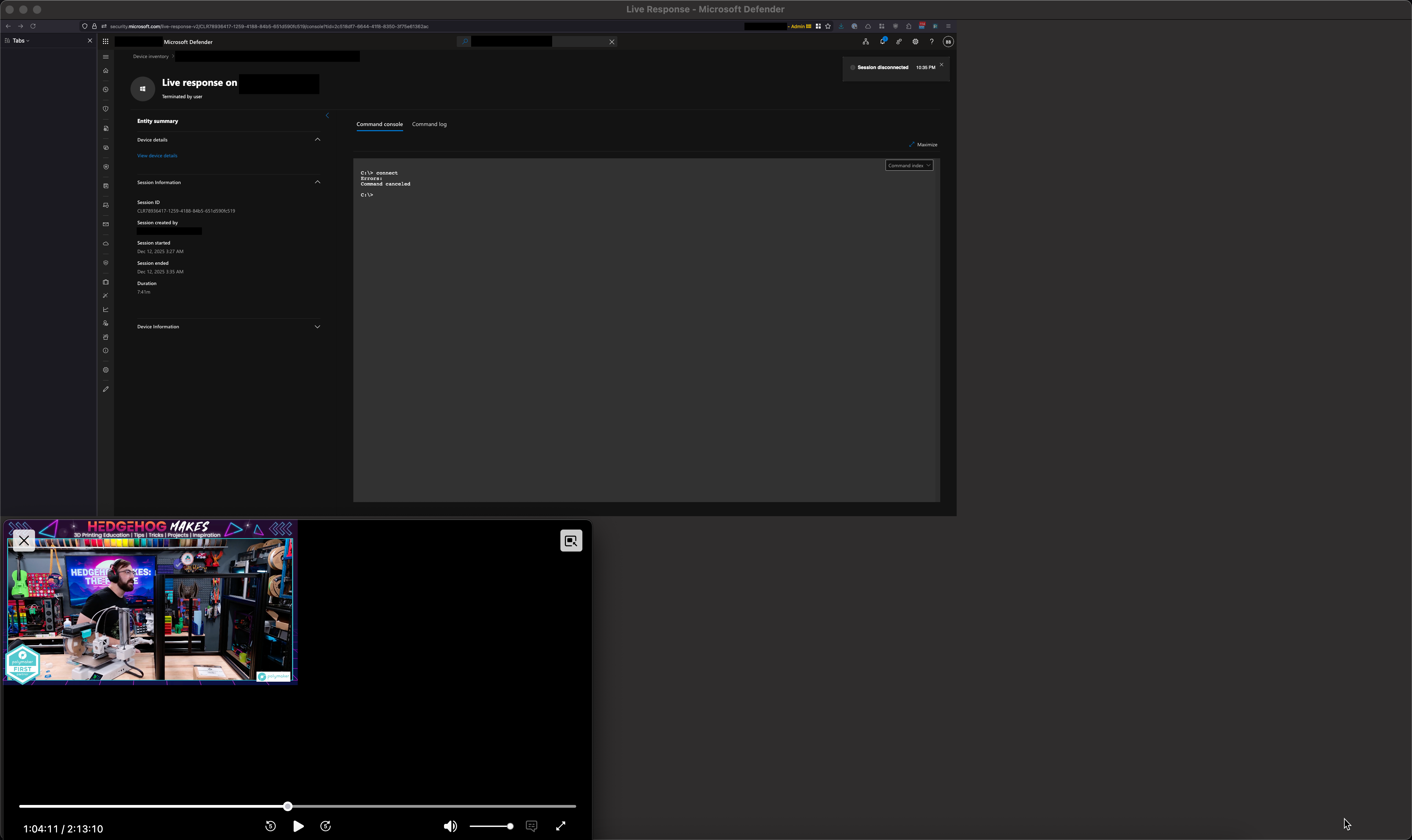
Hello, for quite some time I have been encountering an issue where the scaling of browser elements gets broken when I unplug my Mac from its dock/external display and then being using Firefox using the built in Retina display. This only impacts Firefox and renders Firefox completely useless until I quite Firefox and reopen it. It impacts all open Firefox windows. The attached screenshot explains it better.
Firefox 146.0 (aarch64) MacBook Pro 16-inch, 2023 macOS 15.5 (24F74)
Any ideas?
Изменено archer36
Все ответы (2)
Hi,
Thank you for bringing that up! Could you please try creating a new Firefox profile and see if the issue is reproducible there? In case you use the legacy Profile manager, remember to set your current profile as default again after creating a new one.
If the issue reproduces in a new profile, I'd greatly appreciate it if you could report it on Bugzilla, Mozilla's bug tracker. That will let the developers take a look. If you don't feel comfortable enough with filing a bug, though, just let me know, and I'll do it for you.
Thanks! I'll give that a try, I'll try to run both profiles at once. One without extensions (the new one) and one with (my default profile).