


Unable to Send on ComuServe Account. Starting today.

I saw where there was a same problem liste a couple of months ago but the solution did nto work. As of this morning I can no longer send with my CompuServe Account. There was no change in my settings, and I have had the account in place with Thunderbird for years. I get an error to enter my password again, I do, then no luck. It asks again. When I cancel, I get an alert, sending of the message failed, Unable to authenticate Outgoing Server (SMTP), please check the password and verify the "Authentication method" in "Account Settings|Outgoing Server (SMTP)
I tried change the password authentication from normal to OAuth2. No luck.
No problem with downloading messages; they all come through.
I saved the message to be sent in my Draft Folder and then when going to the web version of CompuServe (really AOL and really Yahoo), my message is saved in the Draft Folder and I can then send it.
Thank you in advance.
Sal
Все ответы (5)
I read elsewhere where somebody wanted screen shots of the settings. I failed to do so. Here they are. Thank you again.

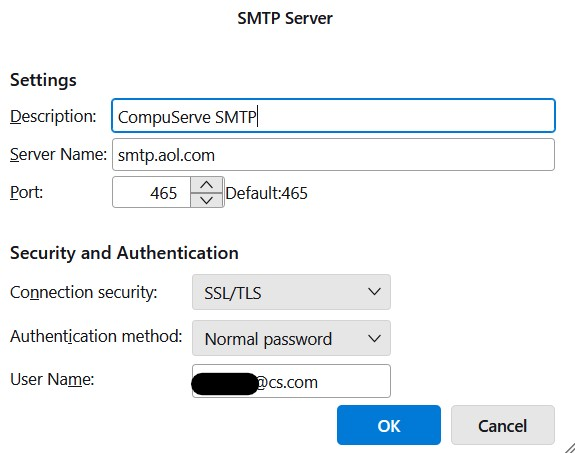

FWIW, I've been using TBird for sending/receiving Compuserve emails for several years; a couple years ago I had a similar situation ... TBird stopped working with Compuserve (sorry, don't recall the exact error message).
Upon regenerating a new (Compuserve/AOL) 'App Password' I was able to get TBird working with Compuserve again.
Background:
Compuserve (aka AOL aka Yahoo) requires a custom 'App Password' for applications like TBird.
Occasionally you need to regen a new 'App Password' (eg, the old 'App Password' expired, email application - TBird in this case - lost/corrupted the 'App Password', etc).
App Password generation and use:
Log into password.aol.com (same login/password you use for mail.aol.com - Compuserve Webmail); this should drop you into login.aol.com/myaccount.
Choose the 'Security' menu/tab, scroll down and under 'Other ways to sign in' click on 'Generate and manage app passwords'; this should open a popup window (if not, make sure browser allows popups for this page) with a title of 'Generate an app password'; to generate a new pwd give your app's name (eg, 'TBird', 'Thunderbird', 'TBird host#1', etc) and then hit the 'Generate password' button; this should present you with your new password; it's important you copy this somewhere safe because you won't be able to display it again; now configure TBird to ask for your Compuserve password, try downloading email and when asked for your password ... enter this newly generated app password, making sure to tell TBird to save the password (for future logins).
Back on that popup ... there's a second session titled 'Manage app passwords'; if you have an old entry for TBird then go ahead and 'delete' that one.
If you fail to make note of your newly generated app password then simply follow the steps to generate the popup window, delete the old app password, and generate a new app password.
NOTES:
- you should be able to generate multiple app passwords if, for example, you're using a couple different applications to access your compuserve email account and you want each application to use a different (app) password
- my TBird config is the same as OP's except the Authentication method is set to OAuth2
Изменено markp
Thank you very much for your help. It seems that the password was not the issue but "magically" a browser window popped up and asked for two point verification. It stated that somebody (me) was trying to log in using Thunderbirds. I verified and saved and now I am up and running again. I did not do anything to prompt the need for the two point verification nor did I know I needed to do so. After logging in to the web mail version to send mail, perhaps, it opened up the two point window ability.
Interestingly, I would not be able to send, save as a draft, open up the web version, see the draft in my Draft folder, then send.
Actually app passwords are not required for all yahoo properties only some and rather specialized ones like compuserver and comcast in particular.
oAuth is the preferred authentication method, and has been used for AOL and Yahoo for years, but has never been made available by Yahoo/AOL for the more niche users. Recent changes in the way Yahoo deal with shared providers means that there can be difficulties setting up oAUth on Yahoo properties unless you delete the Thunderbird cookies first (Yahoo share the same cookies across domains, so you need to delete them in settings before oauth will work if you have say already set up a yahoo email account, then modify the account settings to use Yahoo server names and close the account settings tab and reopen it to make the oauth option actually visible to select.
It may also be relevant that Yahoo have recently rolled back some of their changes that prevented their customers accessing mail in mail clients. Yahoo and it's associated properties is an ongoing sore point as they just keep changing things and offering a generally poor standard of user advice on what changes and how to work with those changes.