


Firefox on Mac will not allow user to complete X's new passcode requirement

I've been using Firefox on Mac and PC for many years, and been on Twitter/X for 12 years. Never had a problem before this.
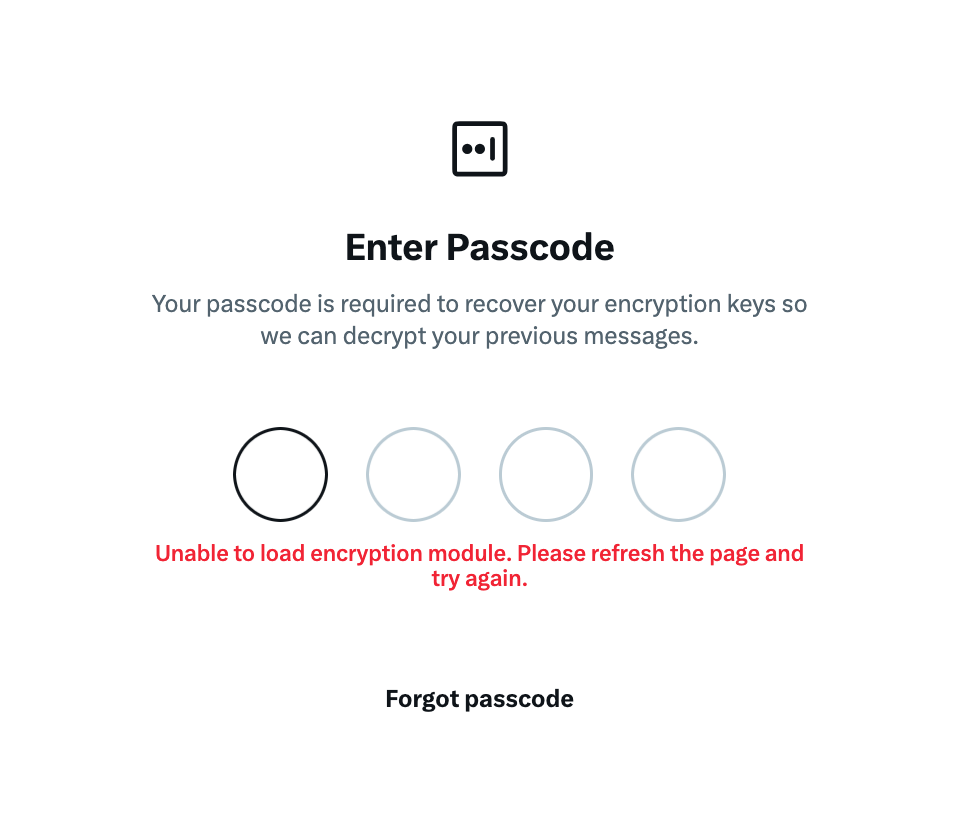
X is now requiring users to enter and verify a 4-digit passcode to be able to use the DM feature. Firefox on Mac won't let me do this. Every time it produces an error message:
"Unable to load encryption module. Please refresh the page and try again."
But when I do it in Safari, or Explorer, or Chrome, it lets me do so.
The problem is, most of my data and resources are on my Macbook, and I have not been able to find a workaround. I've cleared my cache, made sure I'm on the latest version of Firefox, restarted it several times - same thing.
I need to get this fixed. Please help.
Выбранное решение
Hi there,
Could you please try a couple of more things:
- Please check if you have Enhanced Tracking Protection (ETP) enabled. You can do that by clicking the shield
 icon at the left of the address bar.
- If ETP is enabled, try disabling it. Does the problem persist?
- If it does not help, also try clearing cookies and data for the website you experience troubles with (warning: you will be logged out on this website). Does it help?
- If it also does not help, try running Firefox in Troubleshoot Mode. Does the problem persist?
Looking forward to your update!
Прочитайте этот ответ в контексте 👍 1Все ответы (2)
Выбранное решение
Hi there,
Could you please try a couple of more things:
- Please check if you have Enhanced Tracking Protection (ETP) enabled. You can do that by clicking the shield icon at the left of the address bar.
- If ETP is enabled, try disabling it. Does the problem persist?
- If it does not help, also try clearing cookies and data for the website you experience troubles with (warning: you will be logged out on this website). Does it help?
- If it also does not help, try running Firefox in Troubleshoot Mode. Does the problem persist?
Looking forward to your update!