

Windows 10 reached EOS (end of support) on October 14, 2025. For more information, see this article.

Поиск в поддержке

Избегайте мошенников, выдающих себя за службу поддержки. Мы никогда не попросим вас позвонить, отправить текстовое сообщение или поделиться личной информацией. Сообщайте о подозрительной активности, используя функцию «Пожаловаться».

Подробнее

bookmarks

  • 2 ответа
  • 0 имеют эту проблему
  • 86 просмотров
  • Последний ответ от Shandy

дополнительные действия

i even deleted ALL my bookmarks............I cant get rid of the ribbon across the top, no matter how many times i try. And now I see, the bookmarks live on even after I deleted all of them yesterday.
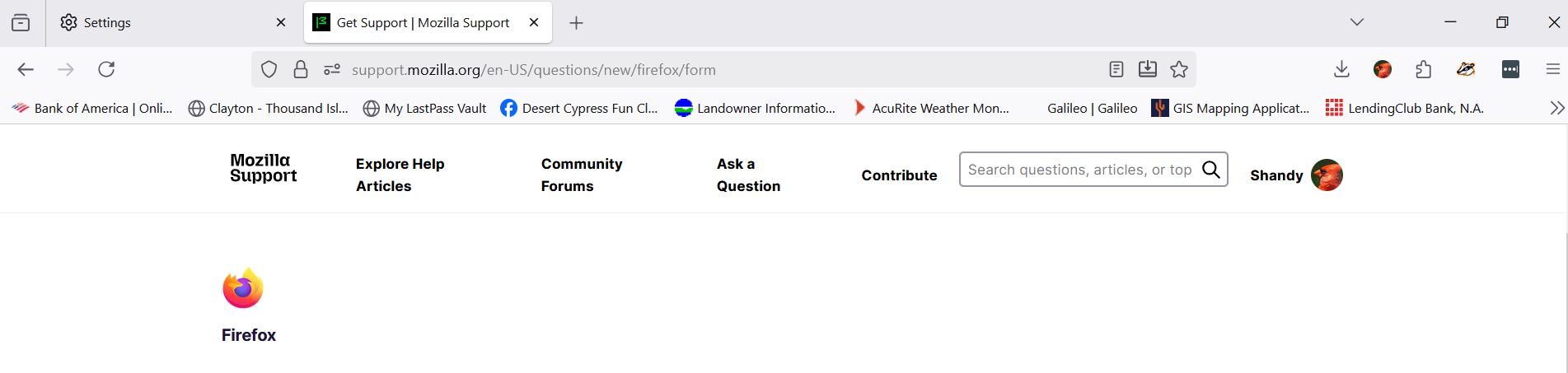
i even deleted ALL my bookmarks............I cant get rid of the ribbon across the top, no matter how many times i try. And now I see, the bookmarks live on even after I deleted all of them yesterday.
Приложенные скриншоты

Выбранное решение

yeah that sounds super annoying 😕 sometimes firefox keeps your old bookmarks synced to your account, so even if you delete them locally they come back. try turning off sync first (Settings → Sync → turn off bookmarks), then delete them again. as for the ribbon, go to “View” → “Toolbars” and uncheck the bookmarks toolbar. restart firefox after that, it should stay gone.

Прочитайте этот ответ в контексте 👍 1

Все ответы (2)

дополнительные действия

Выбранное решение

yeah that sounds super annoying 😕 sometimes firefox keeps your old bookmarks synced to your account, so even if you delete them locally they come back. try turning off sync first (Settings → Sync → turn off bookmarks), then delete them again. as for the ribbon, go to “View” → “Toolbars” and uncheck the bookmarks toolbar. restart firefox after that, it should stay gone.

дополнительные действия

that worked, THANKS

Задать вопрос

Для ответа на сообщения вы должны войти в свою учётную запись. Пожалуйста, задайте новый вопрос, если у вас ещё нет учётной записи.
