


How can I get the Bitwarden icon back in the toolbar? Now I cannot find this important plugin and it is a useless thing when I are not able to find it

How can I get the Bitwarden icon back in the toolbar? I cannot find it and it is useless the way Firefox handels this extension
Выбранное решение
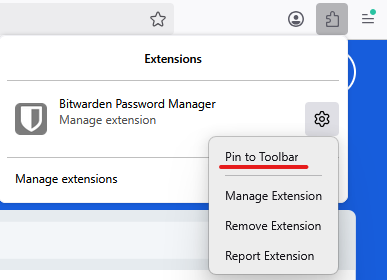
If you have the add-on installed, you can find it in the Extensions menu. Click on the cog icon beside the extension, then select Pin to Toolbar. (See the attached image)
Прочитайте этот ответ в контексте 👍 2Все ответы (4)

How do you mean the way firefox handles the extension? Is it installed?
Yes, of course the app is installed.... On my Windows (10) machine it is visible in the toolbar. On my new Mac Studio it is not visible. It is apparently in the 'extensions valve' and I cannot get it out of there. That's annoying, as it is unusable there: I cannot see if there is a login known by Bitwarden.

Выбранное решение
If you have the add-on installed, you can find it in the Extensions menu. Click on the cog icon beside the extension, then select Pin to Toolbar. (See the attached image)
Many thanks for your help! It is done now and it works as I aspect to use Bitwarden now. Strange that Firefox puts this in the ' vault'. by default as it is of no use there. But you helpt me solve this problem!