


For Web Developers: How do we disable Firefox's 'Securely Generate Password '

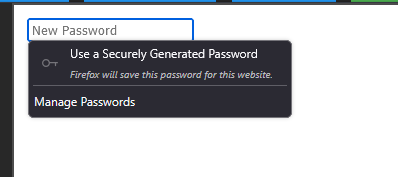
I'm putting together a webpage where employees can change/reset their LDAP passwords. Firefox asks if the user wants to generate a random one.
being an LDAP password, having their Firefox browser generate and manage it would not be practical as not all services using the LDAP password don't all run in Firefox.
Все ответы (3)
If an <input> has autocomplete="new-password", we have a strong signal that password generation is relevant for the field and so we should offer it to the user. With autocomplete="off" user can still generate a password, but he has to use the context menu.
Mozilla rudely ignores autocomplete="off". The internal Mozilla code seems to be checking the field's placeholder, label, name, etc too.
Currently the best way to avoid this is to set the field to readonly on blur, and remove readonly on focus.
This is an L for Firefox. Please give web developers the say so on whether or not feilds should access Firefox's password manager.
view-source:resource://gre/modules/LoginManager.shared.sys.mjs view-source:resource://gre/modules/shared/NewPasswordModel.sys.mjs
Изменено Joseph Kreifels II
Hi,
The people who answer questions here, for the most part, are other users volunteering their time (like me), not Mozilla employees or developers. If you want to leave feedback for developers, you can go to the Firefox Help menu and select Share ideas and feedback…. Alternatively, you can use this link. Your feedback gets collected by a team of people who read it and gather data about the most common issues.
You can also file a bug report or feature request. See File a bug report or feature request for Mozilla products for details.