


Cannot install Firefox on my desktop

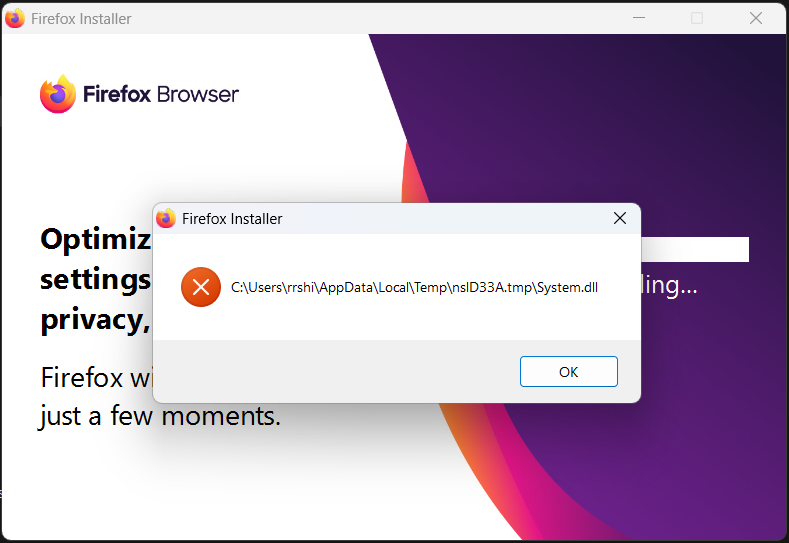
Hi Team, Hope you are doing well. I am not able to install firefox on my win 11 laptop Because of the error shown below. I tried to delete all temp files, I also, restarted my laptop several times and I did the scan to check corrupted files too. Please advice on the further steps.
Thank you.
Все ответы (2)

Not very sure but you can try the following
1. Delete Temporary Files
Press Win + R, type %temp%, and hit Enter.
Delete all files in this folder (skip the ones that are in use).
This clears old installer files that might be causing issues.
2. Download the Full (Offline) Installer
Instead of using the stub installer (which downloads files during installation), get the full version:
Go to the official Firefox offline installer page.
Choose your preferred language and system (e.g., Windows 64-bit).
Download and run the installer.
3. Run as Administrator
Right-click the installer file and select Run as administrator.
This bypasses some permission issues.
4. Temporarily Disable Antivirus
Some antivirus programs (like Avast, AVG, etc.) may block or delete temp .dll files during installation.
Temporarily disable your antivirus and try installing again.
5. Try Installing in Safe Mode (Optional)
Reboot into Windows Safe Mode with Networking.
Run the offline installer from there.
6. Check Disk for Errors (Optional)
Corrupted temp files can also result from disk errors:
Open Command Prompt as admin.
Run: chkdsk C: /f
Follow instructions (may require restart).
shirbhateritwik47 said
Hi Team, Hope you are doing well. I am not able to install firefox on my win 11 laptop Because of the error shown below. I tried to delete all temp files, I also, restarted my laptop several times and I did the scan to check corrupted files too. Please advice on the further steps. Thank you.
Hey! I had the same issue on my Win 11 laptop, what worked for me was downloading the offline installer for Firefox instead of the regular one. Just Google “Firefox offline installer” and grab it from the official Mozilla site. Run it as admin and it should install fine. Hope that helps!