


Down loading Mail

When I download my mail from the server, my system sends a password to verify who is downloading the mail. Where, on my end, is the password located. I have forgotten what it was and want to also access my account from my phone. Need to know what it is, not change it. Thanks Charlie TB 38.5
Выбранное решение
Hi Dave, This version of TB does not have those choices. However, I did finally find where the passwords are hidden. Click on the 3bar thingy and then click on "options". Then click on "Security". Then click on "Saved Passwords". Then click on "show passwords". And there it is! Thanks for your help. I hope this post says up cause I'll probably need it again. Charlie
Все ответы (5)
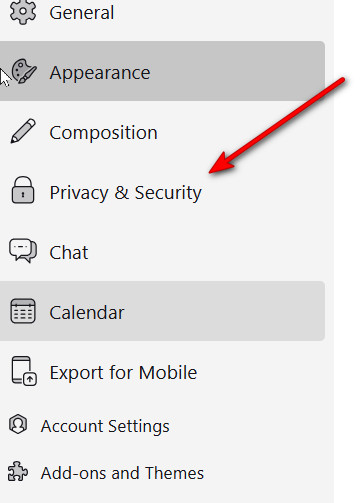
check in settings>privacy&security and click savedpasswords and then showpasswords. if the password is an app password (such as gmail), it may be unique to the PC and not usable on the phone.
Hi Dave, I am using TB38 and it does not have a Privacy&security click point. What I have is "tools", then "account settings", then "server settings", then "Authentication method" and "password transmitted insecurely". With no means to change it or tell what it is. If I go and click on the 3bar thing, and look in all sub menus, there is nothing there either. I only time I can recall anything about the password was when it was setup several years ago. It must be there somewhere cause I can download mail. Charlie TB38
See attached screenshot
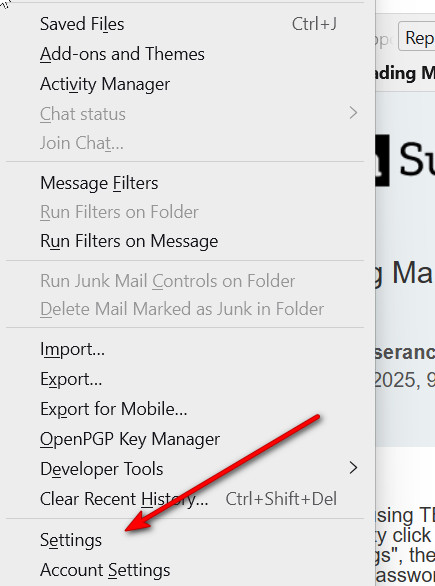
And this from tools menu
Выбранное решение
Hi Dave, This version of TB does not have those choices. However, I did finally find where the passwords are hidden. Click on the 3bar thingy and then click on "options". Then click on "Security". Then click on "Saved Passwords". Then click on "show passwords". And there it is! Thanks for your help. I hope this post says up cause I'll probably need it again. Charlie