How do I unsubscribe from an online Calendar .ics file?

I successfully subscribed to an online .ics file but I found the resulting calendar entries inadequate and I want to unsubscribe but I can't figure out how to do that. I've tried searching for instructions but haven't found any.
Выбранное решение
With the Calendar tab open/active I found "Unsubscribe Selected Calendar..." under the "Events and Tasks" menu and that worked. I don't know why I didn't see it before. It still doesn't resemble the image uploaded by Matt, but at least I have an answer.
Thanks for your help.
Прочитайте этот ответ в контексте 👍 0Все ответы (10)
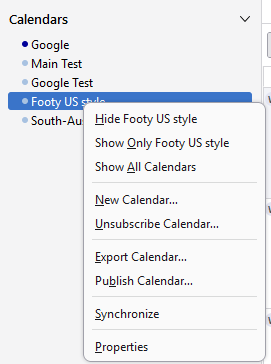
Perhaps try right clicking
Изменено Matt
Matt, thank you, but how do I get to the "Calendars" sub-menu? I don't see it in any of the Thunderbird menus. Btw, I should have noted that I'm running Thunderbird 128.9.1esr 64 bit.
Matt, is there an add on that I need to install to have the "Calendars" menu available?
Alternatively, can I safely disable this calendar by using the Config Editor to toggle the binary entry,
calendar.registry.{lengthy hex string}.disabled false
/Peter

Right click the calendar in the left pane - Unsubscribe Calendar. Can't be that hard.
I'm beginning to think I've missed an update or something... I don't see a "calendar in the left pane"? I've attached a partial screen shot of the upper left quadrant of my TBird window.
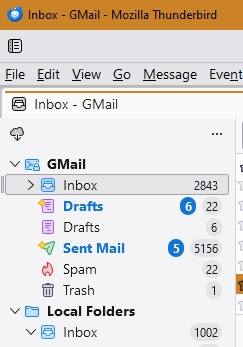
I don't see a "calendar in the left pane"?
You need to open the Calendar tab first.
Выбранное решение
With the Calendar tab open/active I found "Unsubscribe Selected Calendar..." under the "Events and Tasks" menu and that worked. I don't know why I didn't see it before. It still doesn't resemble the image uploaded by Matt, but at least I have an answer.
Thanks for your help.
ph00 said
With the Calendar tab open/active I found "Unsubscribe Selected Calendar..." under the "Events and Tasks" menu and that worked. I don't know why I didn't see it before. It still doesn't resemble the image uploaded by Matt, but at least I have an answer. Thanks for your help.
No because I uploaded an image of the calendars listed in the left of the calendar tab not the menu bar which most users do not have enabled.
This is what most folk see when they open a calendar tab.
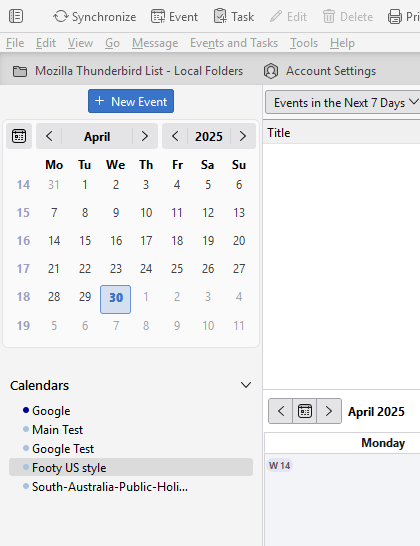
Apparently you don't have that.
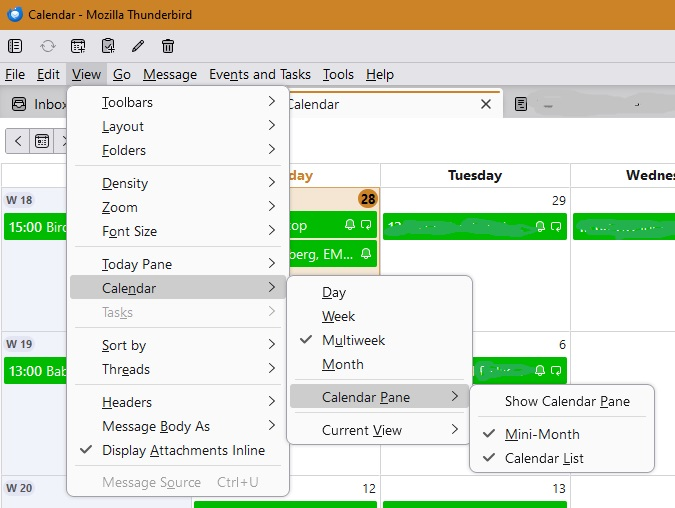
Thanks Matt, the fog is lifting. And I also see how to toggle the "Calendar Pane" on and off: View-Calendar-Calendar Pane-Show Calendar Pane. Good to know; now all I have to do is remember this. :-)