


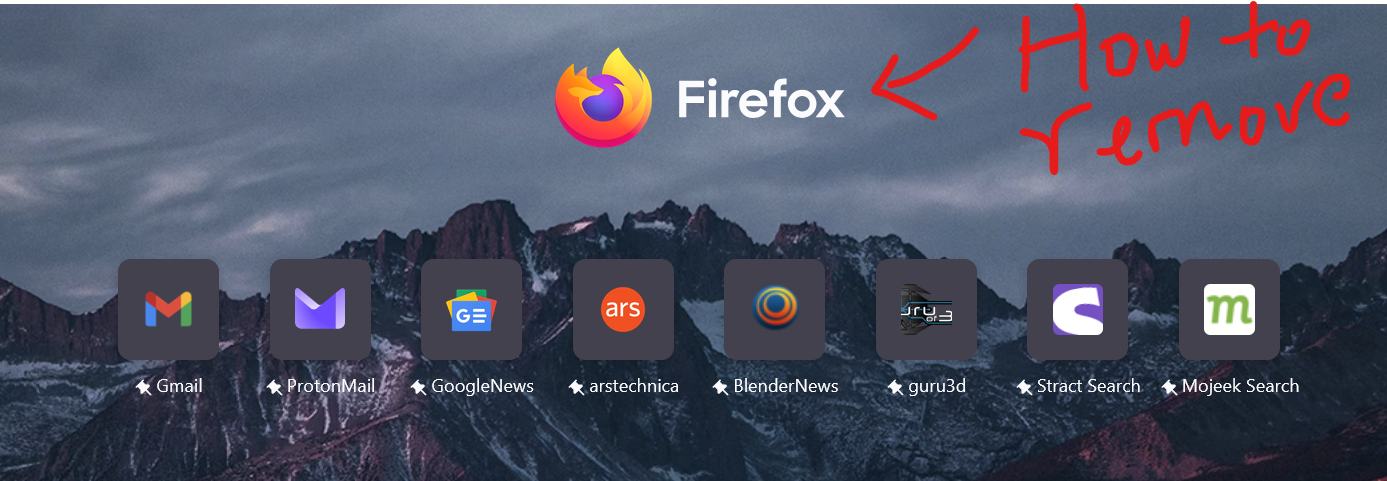
i want to remove the firefox logo from the center of my new tab

after an update i couldn't ignore the now deadcentered firefox logo and wordmark and i can't stop being bothered by its sudden appierance. I looked into the settings and dissabled the EXCACT setting for this problem in the "about:config" going for the one with "wordmark" in the setting but its done nothing.
Все ответы (4)

Screenshot of the error in question?
I have this problem too. After the recent update: 1. A Firefox logo was added to the 'Firefox Home' page on the top. This is a waster of space & a big annoyance. Nothing in the settings (gear icon) to remove it
2. The second minor annoyance is that the icons size (+ margins) for 'shortcuts' has been reduced significantly, with no way to control it according to taste.
Hello
Try 1 - Go to Configuration Editor for Firefox https://support.mozilla.org/en-US/kb/about-config-editor-firefox 2 - Enter a search term browser.newtabpage.activity-stream.newtabLayouts.variant Check, browser.newtabpage.activity-stream.newtabLayouts.variant-b To change a boolean (true-false) preference's value, double-click on the preference.
Take a look at https://connect.mozilla.org/t5/discussions/firefox-134-new-tab/td-p/82999
Изменено Agent virtuel
yes, I just found out this answer on my own as well (by hit-&-miss method). Looks like @Agentvirtuel beat me to it XD XD
Can confirm, this solved both problems, by simply turning to 'false' the 'variant-b'. The shortcuts are also back to large size.
Though I wonder if there is a setting for this as well? i.e., to control shortcut logo size precisely?