


Windows 10 reached EOS (end of support) on October 14, 2025. If you are on Windows 10, see this article.

Поиск в поддержке

Избегайте мошенников, выдающих себя за службу поддержки. Мы никогда не попросим вас позвонить, отправить текстовое сообщение или поделиться личной информацией. Сообщайте о подозрительной активности, используя функцию «Пожаловаться».

Подробнее

Sorting emails by date doesn't work

  • 2 ответа
  • 0 имеют эту проблему
  • 50 просмотров
  • Последний ответ от Matt

Often I need to see the history of a conversation, and for that I need to have emails listed chronologically.

I would expect that clicking on the date header (which tooltip "Sort by date") would do that, but it's not the case).

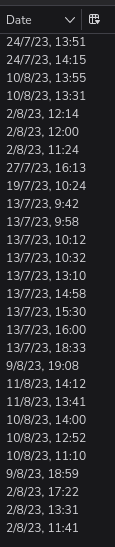
For example: https://imgur.com/hhCd9zF.png (also attached).

In the screenshot, from top to bottom, you can see emails sent in July 2023, then August 2023, then July 2023 again, then more August 2023. The order is clearly messed up.

I've had this issue for a very long time and it's very hampering.

Thanks. Cheers, Manuel
Often I need to see the history of a conversation, and for that I need to have emails listed chronologically. I would expect that clicking on the date header (which tooltip "Sort by date") would do that, but it's not the case). For example: https://imgur.com/hhCd9zF.png (also attached). In the screenshot, from top to bottom, you can see emails sent in July 2023, then August 2023, then July 2023 again, then more August 2023. The order is clearly messed up. I've had this issue for a very long time and it's very hampering. Thanks. Cheers, Manuel
Приложенные скриншоты

Все ответы (2)

I forgot to mention I use version 115.12.2 (64-bit)

Sorting by date works within the confines of the threading. So turn off threading in the relevant folder and I think you issue will go away.

https://support.mozilla.org/en-US/kb/message-threading-thunderbird#