

Эта тема была архивирована.
Если вам нужна помощь, задайте новый вопрос.

Архивировано
How do I stop those actualization pop-ups for add-ons in Firefox?

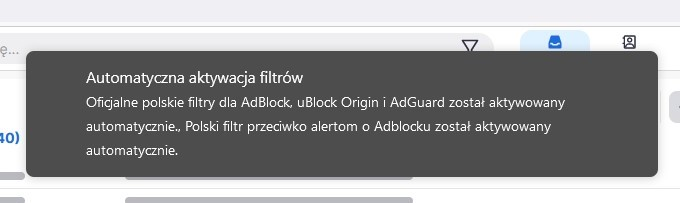
Hi, got a problem for the last several days - on each visited site Firefox (my guess) is launching a pop up about add-ons for Ad Blocks tham I am using were updated with official national filters for Polish market.
This is super annoying and the pop-up jumps on almost every new site bieng visited (it is visible for ca. 5 seconds). Is there any way to stop it? How can I dissable this feature?
Thanks, r.
Hi,
got a problem for the last several days - on each visited site Firefox (my guess) is launching a pop up about add-ons for Ad Blocks tham I am using were updated with official national filters for Polish market.
This is super annoying and the pop-up jumps on almost every new site bieng visited (it is visible for ca. 5 seconds). Is there any way to stop it? How can I dissable this feature?
Thanks, r.
Все ответы (1)
HELP! Anyone? Still being flooded with the pop-ups from Firefox ad-ons. It is seriously super annoying :(