


How delete Google as the default search engine

Tell me how to delete Google as the default search engine & replace it with another one. If I can't do this I will remove Firefox and also the Mozilla VPN from all my computers. I have used Firefox for years and supported Mozilla. As far as I'm concerned you people have lost your way if you do not give people the option to change their default search engine.
Tell me how to delete Google as the default search engine & replace it with another one. If I can't do this I will remove Firefox and also the Mozilla VPN from all my computers. I have used Firefox for years and supported Mozilla. As far as I'm concerned you people have lost your way if you do not give people the option to change their default search engine.
Все ответы (2)
- Click the menu button
 and select Settings.
- Select Search in the left pane.
-
- Use the drop down menu under Default Search Engine to choose the search engine you wish to use by default.
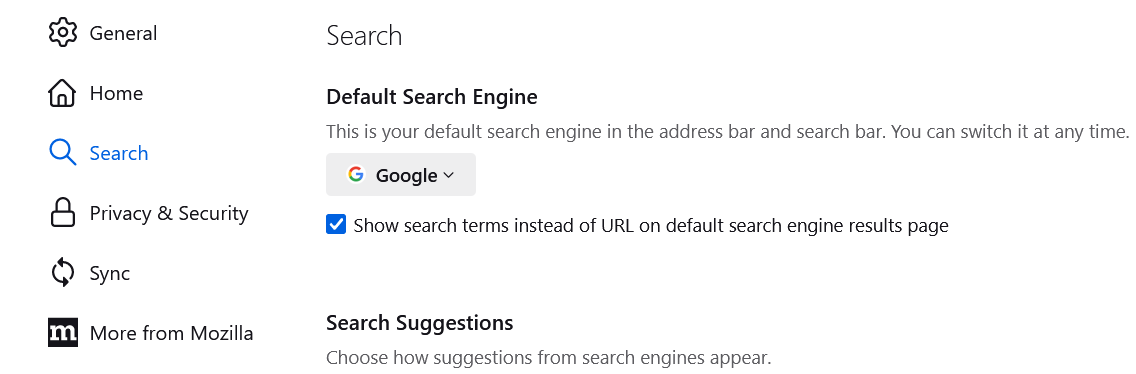
Firefox normally includes Bing and DuckDuckGo as general web search sites you can select instead of Google. if there is a different site that you prefer, but you haven't found a way to add it as a default search engine, you could mention what you've tried so far.