


How to save bookmarks in the "Other Bookmarks" folder

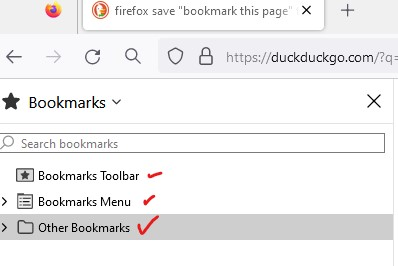
In the right hand Bookmarks column of my Firefox, there are three items: Bookmarks Toolbar, Bookmarks Menus and Other Bookmarks (see attached image).
When I do a “save this page,” the bookmark ends up in the Bookmarks Toolbar section. I want the “save this page” page to go to the Other Bookmarks folder. How do I do this?
Thank you very much!
Выбранное решение
It might be easier for you to add the Default Bookmark Folder extension.
Прочитайте этот ответ в контексте 👍 0Все ответы (5)
Go to about:config in the address bar and change browser.bookmarks.defaultLocation to unfiled.
Hi,
Thank you for responding.
When I put about:config in the Firefox address bar and hit enter, I get a warning page...if I ignore the warning, I get a new page that contains a search window for preferences. I stopped at this point.
Am I doing this right?
Выбранное решение
It might be easier for you to add the Default Bookmark Folder extension.

I never save to "Other bookmarks" but there seems to be nothing stopping me from doing so.
That extension is faulty, so much so that I have removed it.
I actually see: unfiled_____ Note that Firefox remembers the location where you last saved a bookmark (doesn't apply to dragging that link/tab).
